> This is part 1 of 2 of the full documentation (pages 1–100 of 106).
> The content is paginated: fetch every part to see all of it.
> Next part: https://help.screena.ai/resources/llms-full.txt/1
> Page index: https://help.screena.ai/resources/llms.txt

# Introduction

Find answers to some of the most frequently asked questions

## What is Screena?

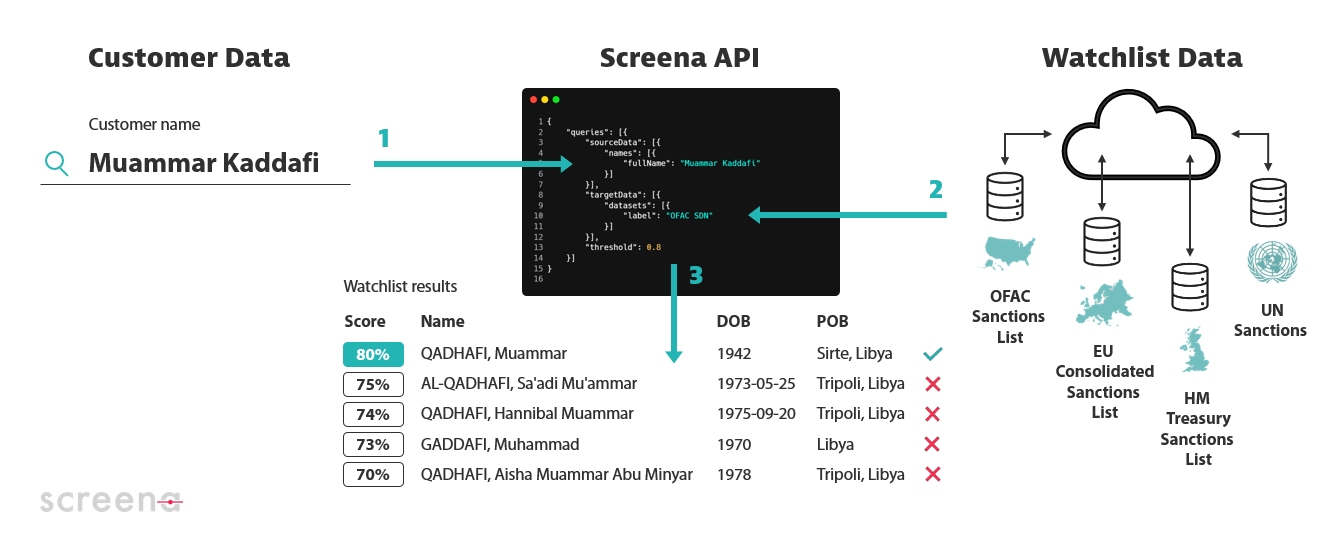
Screena is a **watchlist screening API** powered by machine learning that accurately verifies names of people and organizations against vast databases – at speed and at scale.

<figure><img src="https://2401496031-files.gitbook.io/~/files/v0/b/gitbook-x-prod.appspot.com/o/spaces%2F0Al0j8H9zAyjprZOrm47%2Fuploads%2FWHJNtTZ98XikewXjj3MR%2Fwhat%20is%20screena.png?alt=media&amp;token=b889c708-8209-4f67-9e9c-1258c3733293" alt=""><figcaption><p>Screena 101</p></figcaption></figure>

## Why Screena?

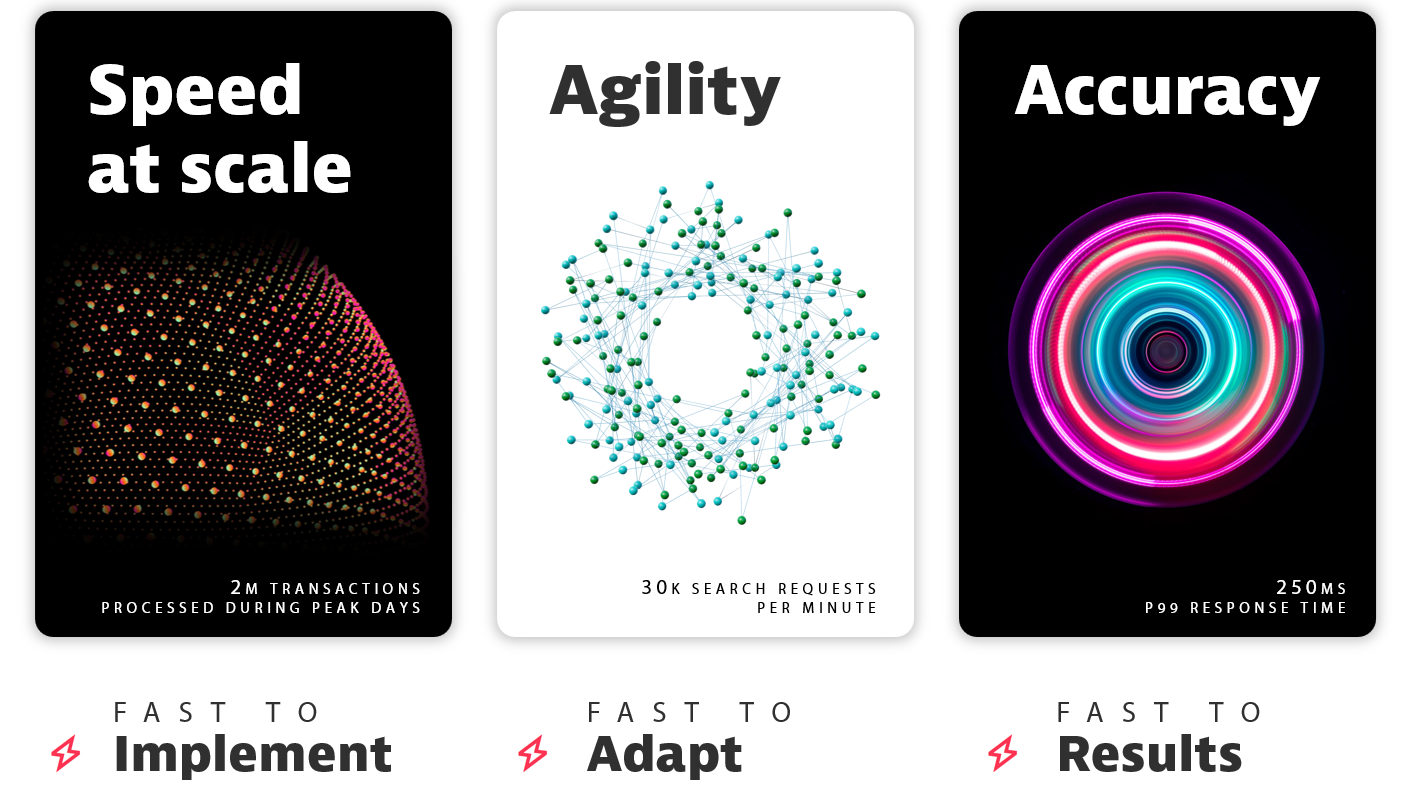
<figure><img src="https://2401496031-files.gitbook.io/~/files/v0/b/gitbook-x-prod.appspot.com/o/spaces%2F0Al0j8H9zAyjprZOrm47%2Fuploads%2F3vVM9GWeveD0u6tCxn00%2FWhy%20Screena.png?alt=media&amp;token=1546db99-0c10-4e3f-9002-ef4b8a4529f4" alt=""><figcaption><p>Screena Value Proposition</p></figcaption></figure>

## Exploring Screena FAQs

<table data-view="cards"><thead><tr><th></th><th></th><th></th><th data-hidden data-card-target data-type="content-ref"></th></tr></thead><tbody><tr><td><a href="/resources/faq/name-matching"><strong>Name Matching</strong></a></td><td><span data-gb-custom-inline data-tag="emoji" data-code="1f524">🔤</span></td><td>All about Screena's secret sauce: algorithms </td><td></td></tr><tr><td><a href="/resources/faq/watchlists"><strong>Watchlists</strong></a> </td><td><span data-gb-custom-inline data-tag="emoji" data-code="1f534">🔴</span></td><td>Learn how Screena makes the most of sanctions, PEPs and adverse media data</td><td></td></tr><tr><td><a href="/resources/faq/performance"><strong>Performance</strong></a></td><td><span data-gb-custom-inline data-tag="emoji" data-code="23e9">⏩</span></td><td>Find out why our cloud-native technology is built for speed and scalability</td><td></td></tr><tr><td><a href="/resources/faq/integration"><strong>Integration</strong></a></td><td><span data-gb-custom-inline data-tag="emoji" data-code="1f50c">🔌</span></td><td>Because no one wants to get locked into monolithic solutions</td><td></td></tr><tr><td><a href="/resources/faq/personalization"><strong>Personalization</strong></a></td><td><span data-gb-custom-inline data-tag="emoji" data-code="1f39b">🎛️</span></td><td>Learn how to personalize and optimize your screening experience</td><td></td></tr><tr><td><a href="/resources/faq/hosting-and-deployment"><strong>Hosting &#x26; Deployment</strong></a></td><td><span data-gb-custom-inline data-tag="emoji" data-code="1f310">🌐</span></td><td>Learn more about Screena infrastructure and deployment model</td><td></td></tr><tr><td><a href="/resources/faq/pricing-and-support"><strong>Pricing &#x26; Support</strong></a></td><td><span data-gb-custom-inline data-tag="emoji" data-code="1f4b3">💳</span></td><td>Understand what you pay for</td><td></td></tr><tr><td><a href="/resources/faq/security-and-audit"><strong>Security &#x26; Audit</strong></a></td><td><span data-gb-custom-inline data-tag="emoji" data-code="1f6e1">🛡️</span></td><td>Discover why privacy and security are Screena's foremost priorities</td><td></td></tr><tr><td><a href="/resources/faq/tech-stack"><strong>Tech Stack</strong></a></td><td><span data-gb-custom-inline data-tag="emoji" data-code="2699">⚙️</span></td><td>Take a look at what's under the hood</td><td></td></tr><tr><td><a href="https://developer.screena.ai/"><strong>API Reference</strong></a></td><td><span data-gb-custom-inline data-tag="emoji" data-code="1f4d8">📘</span></td><td>A full reference of Screena API endpoints</td><td></td></tr><tr><td><a href="https://screena-api.statuspage.io/"><strong>API Status</strong></a></td><td><span data-gb-custom-inline data-tag="emoji" data-code="1f6a5">🚥</span></td><td>Check Screena API status and stay informed during downtime</td><td></td></tr></tbody></table>

> **Not finding what you're looking for?** We're here for you! Email us at <experts@screena.ai> and we'll help you out.


# Name Matching

{% content-ref url="/pages/727OVbfKRBZ72ZLFByHN" %}
[Does Screena provide rules-based and/or fuzzy matching capabilities?](/resources/faq/name-matching/does-screena-provide-rules-based-and-or-fuzzy-matching-capabilities)
{% endcontent-ref %}

{% content-ref url="/pages/1rJJ2iXHal0xibHznO6x" %}
[Does Screena have any machine learning or AI capabilities?](/resources/faq/name-matching/does-screena-have-any-machine-learning-or-ai-capabilities)
{% endcontent-ref %}

{% content-ref url="/pages/St36Xcef326cBaoIV9aa" %}
[What are name cultures and how does Screena handle them?](/resources/faq/name-matching/what-are-name-cultures-and-how-does-screena-handle-them)
{% endcontent-ref %}

{% content-ref url="/pages/AhdgXGxefhmUQ9WG2dHL" %}
[How does Screena handle different scripts, diacritics, and transliteration?](/resources/faq/name-matching/how-does-screena-handle-different-scripts-diacritics-and-transliteration)
{% endcontent-ref %}

{% content-ref url="/pages/hV4fmp0plStFB3t99viG" %}
[How does Screena handle common names?](/resources/faq/name-matching/how-does-screena-handle-common-names)
{% endcontent-ref %}

{% content-ref url="/pages/bEufZtbIa9r5MkPJNtFZ" %}
[How does Screena handle inaccurate data?](/resources/faq/name-matching/how-does-screena-handle-inaccurate-data)
{% endcontent-ref %}

{% content-ref url="/pages/jD7A5xz3Jruvrs4SaOvQ" %}
[What methods does Screena use to reduce false positives?](/resources/faq/name-matching/what-methods-does-screena-use-to-reduce-false-positives)
{% endcontent-ref %}

{% content-ref url="/pages/yo748ZzNeg3L5v8Mfy7j" %}
[What is the percentage of false positives reduced with the methods used by Screena?](/resources/faq/name-matching/what-is-the-percentage-of-false-positives-reduced-with-the-methods-used-by-screena)
{% endcontent-ref %}

{% content-ref url="/pages/o48EE9umvKyvhTsbD9EP" %}
[How does whitelisting work?](/resources/faq/name-matching/how-does-whitelisting-work)
{% endcontent-ref %}

{% content-ref url="/pages/HkRhlwNazHvthWxOI53o" %}
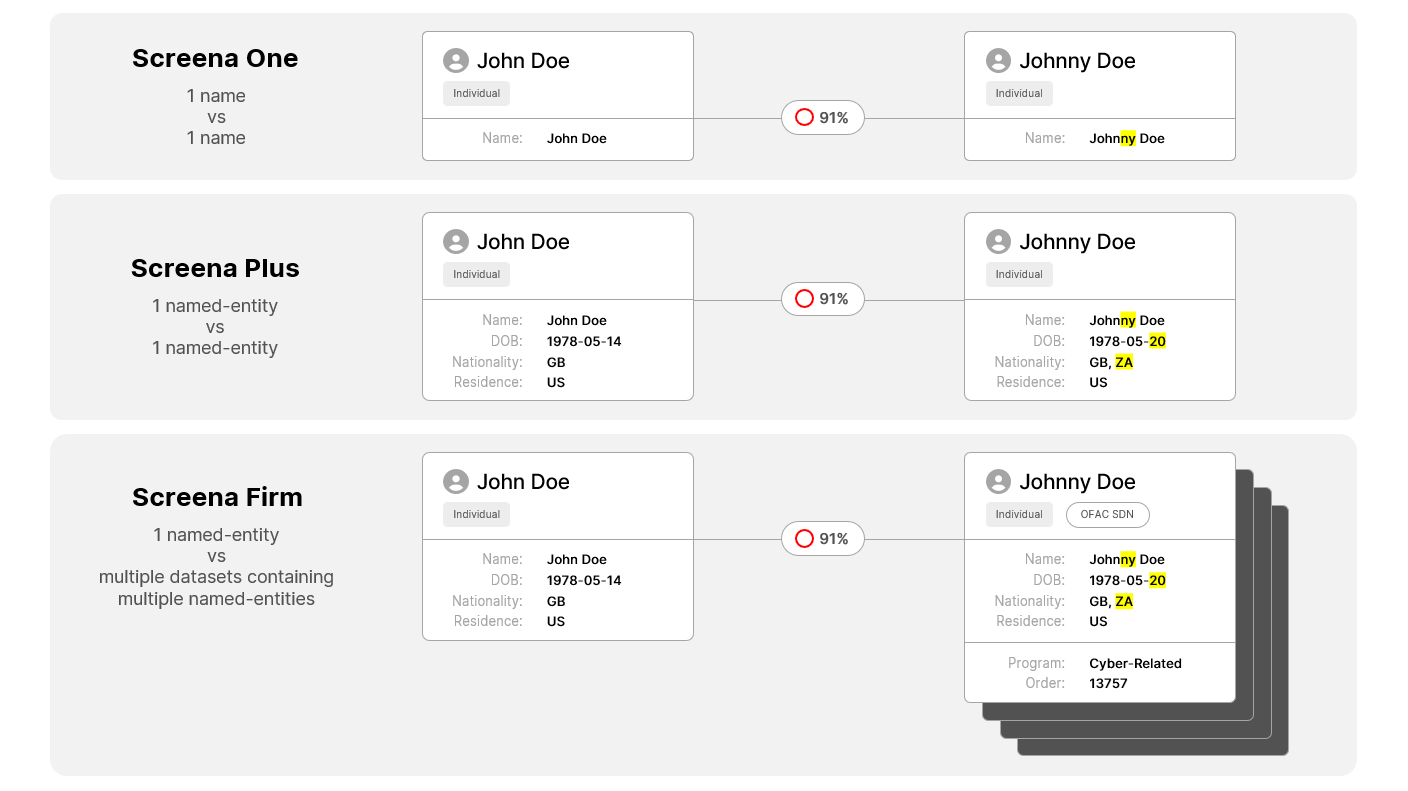
[What differentiates pairwise name-matching between Screena One and Screena Plus?](/resources/faq/name-matching/what-differentiates-pairwise-name-matching-between-screena-one-and-screena-plus)
{% endcontent-ref %}

{% content-ref url="/pages/xiaW6ZBtOicK4KlqMsbM" %}
[How does secondary attributes-matching work?](/resources/faq/name-matching/how-does-secondary-attributes-matching-work)
{% endcontent-ref %}

{% content-ref url="/pages/YYYKR0I2Tb9rYk5XUTvd" %}
[Can Screena match beyond names and allow firms to blacklist identifiers or locations?](/resources/faq/name-matching/can-screena-match-beyond-names-and-allow-firms-to-blacklist-identifiers-or-locations)
{% endcontent-ref %}

{% content-ref url="/pages/fPRfJT7YyQdcF87m7zS9" %}
[What is the difference between 'matchingNames' in screening responses and 'names' in 'targetData'?](/resources/faq/name-matching/what-is-the-difference-between-matchingnames-in-screening-responses-and-names-in-targetdata)
{% endcontent-ref %}


# Does Screena provide rules-based and/or fuzzy matching capabilities?

Screena name-matching approach is twofold with a combination of **deterministic rules** and **predictive scoring** methods to minimize false negatives (i.e., achieving high recall) and false positives (i.e., achieving high precision).

Rules-based and fuzzy matching is the core approach to ensure **high recall** before reducing false positives through our machine learning models.

We first employ traditional **edit distance algorithms** such as [Jaro](https://en.wikipedia.org/wiki/Jaro%E2%80%93Winkler_distance) to measure string similarity when initiating searches on lists. We also apply **rules-based algorithms** and use proprietary name libraries to detect specific name patterns that can not be addressed through string distance alone. These include, but are not limited to:

* Name order variations and missing name components,
* Misspellings and errors (inverted letters, missing letters, substituted letters),
* Truncated names,
* Name concatenations,
* Acronyms and initials,
* Nicknames, synonyms and common aliases,
* Titles, honorifics and company legal forms,
* Phonetic resemblances,
* Detection of stopwords, linking words and weighting of common words,
* Detection of locations (cities, towns, regions, ports),
* Numbers variation,
* Domain names.


# Does Screena have any machine learning or AI capabilities?

Machine learning prediction scoring is at the core of our matching engine to reduce false positives when simple deterministic rules are not accurate enough to retain or reject candidate hits immediately.

We first identify the **typology** and **cultural context** of both customer and list names. Detecting the [typology](https://developer.screena.ai/#about-objects) and the [culture of a name](https://developer.screena.ai/#name-cultures) is instrumental in directing candidate hits to the most suitable machine learning models.

We then have distinct **supervised machine learning models** specifically trained across hundred thousand names for either individual or organization names. For individuals, our models are segmented across distinct cultural groups. We train each model with specific name datasets. Our machine learning models encompass more than **100 name-matching features** to increase the accuracy of name similarity scoring and dramatically reduce the number of false positives.

We are also developing new AI techniques to automatically detect geographical elements within unstructured fields in the context of transaction screening. Such technics can help to accurately parse named-entities and addresses, ensuring adequate matching of semantically similar elements against entity and embargo lists.


# What are name cultures and how does Screena handle them?

## What is a name culture?

At Screena, "name cultures" refer to the categorization of names based on the cultural context in which they are used, recognizing the diversity in name conventions across different regions and cultural groups. This approach goes beyond simply classifying names by language or alphabet.

## **How does Screena identify and use name cultures?**

Our system uses an automated process to identify individual name cultures, which are represented using romanized scripts and assigned a two-letter code based on the [ISO 639-1](https://en.wikipedia.org/wiki/List_of_ISO_639-1_codes) standards. By doing so, we enhance the accuracy of name matching through the deployment of AI models tailored to specific cultural contexts.

For example, the name "Jean Dupont" is typically associated with French culture and is processed using models that are sensitive to French naming conventions. Similarly, "Christopher Harris" would be recognized under an English-speaking culture, using models designed for English names.


# How does Screena handle different scripts, diacritics, and transliteration?

## **Does Screena support different scripts and diacritics?**

Yes, Screena handles a wide range of scripts and accommodates the specific characteristics of each, including diacritics that are prevalent in some languages but not in others.

For instance, while both English and French are part of the Roman script family, French often uses accents such as é and è, which are less common in English.

Our system is proficient in processing these features to ensure high accuracy in name matching.

## **What about transliteration and original scripts?**

Screena supports transliteration between scripts, allowing for the accurate matching of names across different writing systems.

For instance, our system can transliterate names from Roman to Hebrew and vice versa.

This feature is crucial for global operations where names may be presented in various scripts, including Cyrillic and others.


# How does Screena handle common names?

We combine multiple technics to increase matching accuracy for common names.

[Secondary attributes-matching](/resources/faq/name-matching/how-does-secondary-attributes-matching-work) is one efficient method for automatically discarding a considerable portion of false hits.

In addition to secondary attributes-matching, our algorithms allow excluding matches for specific entity types. It is beneficial to prevent irrelevant matches of common names such as those of individuals or organizations against vessel names (e.g., "**Christina**" or "**Mariana**").

When secondary attributes are either missing or difficult to rely on due to data quality issues, our machine learning models have been extensively trained to overcome the challenges of names very common to specific cultures (e.g., "**Mohamed Ali**", "**Liu Wei**").

Furthermore, threshold sensitivity is automatically recalibrated based on the detected culture. This technique delivers better results for highly challenging cultures such as Chinese, Korean or Vietnamese.

Some machine learning features have been included to apply specific weighting to common name elements of individuals (e.g., "**Al**", "**Ben**") or organizations (e.g., "**bank**", "**international**", "**services**"). We also provide a list of stopwords and linking words in multiple languages (e.g., "**and**", "**or**") to eliminate false positives when screening narrative fields within payments.

Screena comes out with a set of options to determine how to handle matches against short names. For instance, it is possible to systematically discard matches against single-token names contained within full names (e.g., "**Arthur Timothy Smith**" matching with "**Arthur**"). These parameters can be differentiated per entity type and tuned based on the number of tokens being screened.


# How does Screena handle inaccurate data?

Before all, let’s clarify what inaccurate data is. Either human or machine errors can cause inaccurate data. It takes various forms: manual data mistakes (e.g., permuted name fields), missing data entry controls, unstructured/free format fields, missing or non-standardized information in databases, incompatible formats between data processing systems, etc.

Screena systematically controls the completeness and quality of imported data. For example, Screena ensures dates are always provided in accordance with the [ISO 8601 format](https://en.wikipedia.org/wiki/ISO_8601). Likewise, countries shall always be imported in [ISO 3166-alpha 2 format](https://en.wikipedia.org/wiki/ISO_3166-1_alpha-2).

When the original data is not compliant with those standards, Screena tries to resolve it using specific [normalization rules](https://developer.screena.ai/#normalization) and [libraries](https://developer.screena.ai/#libraries). This normalization process harmonizes and transforms data into a format that makes attribute matching consistent. Normalization libraries are enriched with new synonyms or alternative spellings whenever an unknown or incompatible value is provided.

Screena’s [rules-based algorithms](/resources/faq/name-matching/does-screena-provide-rules-based-and-or-fuzzy-matching-capabilities) tackle specific data quality issues such as typos, truncated names, out-of-order name elements, and split or concatenated names.

Screena data model also provides distinct fields to differentiate structured and unstructured information (e.g., parsed names vs. full names, structured addresses vs. free format addresses).

Distinct [algorithm parameters](https://developer.screena.ai/#algorithms) are actionable to handle all data quality nuances. For example, it is possible to use the parameter `nullMatch` and specify how a match should be handled when one attribute associated with an algorithm is either empty or not provided.

In other instances, inaccurate dates can be matched within the same year or decade.

Similarly, addresses can be matched within the same region or subregion based on the [United Nations geoscheme](https://developer.screena.ai/#un-grouping).

To achieve greater precision when screening free format fields, Screena applies advanced text analytics technics to detect distinct objects (named entities vs. addresses) within the same field and thus prevent irrelevant matches.

When it comes to name matching, Screena will call out generic machine learning models specifically trained with richer comprehensive datasets if no valid culture can be determined with high certainty.


# What methods does Screena use to reduce false positives?

Besides traditional technics such as whitelisting, false positives are reduced with three combined methods:

1. [**Secondary attributes-matching**](/resources/faq/name-matching/how-does-secondary-attributes-matching-work) to automatically discard hits where names match but other entity attributes are incompatible. These attributes include entity types, sexes, BICs, LEIs, dates of birth, dates of registry, date of build, places of birth, places of registry, places of build, addresses, nationalities, flags, etc.
2. [**Machine learning prediction scoring**](/resources/faq/name-matching/does-screena-have-any-machine-learning-or-ai-capabilities) based on 100+ name matching features to go way beyond the natural limitations of traditional fuzzy algorithms and increase scoring precision by analyzing numerous name characteristics altogether.
3. [**Delta screening**](https://developer.screena.ai/#periodic-screening) to avoid periodically regenerating the same results. When using delta screening, once all source records have been screened against all watchlist records, only deltas are considered (i.e., any new record or any update on at least one of the fields used for matching is deemed a delta).


# What is the percentage of false positives reduced with the methods used by Screena?

Many screening vendors claim they deliver 90% fewer false positives. Others 70% or 95%. Without ever putting such figures in context. How many data points have been used? Was the data of good quality? How many records in total were screened? Was there any impact measured on false negatives? What was the method used to determine true positives vs. false positives? Were the results consistently reviewed based on a 4-eye control principle? Etc.

In other words, without any contextual element, these figures have little to no scientific value. It also raises the question: if almost every vendor can reduce false positives in dramatic proportions, then why does screening remain such a critical problem for so many organizations worldwide today?

Therefore, we at Screena are very cautious and humble before communicating any percentage in terms of false positives reduced. In our view, even one-digit incremental gains in screening quality can have a massive impact on large-scale operations. And that’s precisely what our clients observe using our technology.


# How does whitelisting work?

Whitelisting requires two things:

1. Activating the [Delta Screening](https://developer.screena.ai/#about-delta-screening) option when creating a new [API key](https://developer.screena.ai/#authentication).
2. All entities sent for screening should be associated with a `dataID` to track the results when performing a search on any entity sent to the API. If there are any hits, the system takes note of this, and will not return the same results for subsequent searches on that entity, unless the contents of those results change as well.

{% hint style="info" %}
To set up Delta Screening for your Screena Firm subscription, contact <experts@screena.ai>
{% endhint %}

{% hint style="info" %}
It is possible to control and turn off Delta Screening per request using the parameter `lastMatch` which shall be set at `false`.
{% endhint %}


# What differentiates pairwise name-matching between Screena One and Screena Plus?

The answer can be found under the **Pricing & Support** section at this page:

{% content-ref url="/pages/7558NT5kgeIrjRAOZHTp" %}
[Can you clarify the difference between Screena One, Plus and Firm?](/resources/faq/pricing-and-support/can-you-clarify-the-difference-between-screena-one-plus-and-firm)
{% endcontent-ref %}


# How does secondary attributes-matching work?

Matching named entities requires algorithms to determine how data should be matched. In this regard, we distinguish [**name-matching algorithms**](https://developer.screena.ai/#name-matching-algorithms) from **secondary attributes-matching algorithms**.

Matching names requires a **threshold value** between 0 and 100%. This value helps to determine the point where it becomes highly probable that two names are the same.

In addition to name matching, it is also possible to apply specific [**matching algorithms**](https://developer.screena.ai/#algorithms) to secondary attributes (e.g., date of birth, address, nationality). Using secondary attributes-matching algorithms helps to automatically discard irrelevant matches (i.e., false positives) by leveraging more data points than names alone.

{% hint style="info" %}
You can check [Screena Plus endpoints](https://developer.screena.ai/#screena-plus) to find out all secondary attributes available per type of entity (i.e., individuals, organizations, vessels).
{% endhint %}

Here is a code example of how to search an individual with date of birth as a secondary attribute.

This request uses the [date-matching algorithm](https://developer.screena.ai/#date-matching-algorithms) `dateOfBirthAlgo` to match dates of birth within the same year:

{% code lineNumbers="true" %}

```json
{
	"queries": [{
		"sourceData": [{
			"names": [{
				"fullName": "Adan Antonio Blanco Rodriguez"
			}],
			"datesOfBirth": [{
				"date": "1968-03-18"
			}]
		}],
		"targetData": [{
			"datasets": [{
				"label": "USA"
			}]
		}],
		"threshold": 0.8,
		"dateOfBirthAlgo": {
			"type": "same_year"
		}
	}]
}
```

{% endcode %}


# Can Screena match beyond names and allow firms to blacklist identifiers or locations?

Screena is more than just a pure name-matching tool. Our API revolves around three primary matching categories:

1. **Named-Entity Matching**: This matches names of individuals, organizations, or vessels. It can also be combined with secondary attributes such as addresses, dates of birth, or nationalities.
2. **Identifier Matching**: This is designed to match unique identifiers, such as passport numbers, BICs, LEIs, or digital currency identifiers.
3. **Geo Matching**: This focuses on geographical data, encompassing countries, cities, towns, regions, and ports.

Firms can blacklist any of these elements using their own private lists or libraries.


# What is the difference between 'matchingNames' in screening responses and 'names' in 'targetData'?

"The `matchingNames` object returns the precise name from a target dataset's record that initiated a match.

Often, the target record includes multiple name variations, such as the primary name, aliases, or alternative spellings in non-Latin scripts. The `matchingNames` object enhances explainability by pinpointing the exact name from the target record responsible for the match, with the response score being directly linked to this name.

Screena consistently provides a unique matching name for this object in the response, which can be either a full name or a parsed name. Notably, this object is always included in named-entity matching scenarios.

In geo matching, however, this object is not included.

In identifier matching, it is included only if an associated name exists with the matching identifier. For instance, when matching digital currency identifiers, a named entity is not always present in the watchlist alongside the identifier, such as a crypto wallet address.


# Watchlists

{% content-ref url="/pages/otFJSrFSTCrptM6VXKf4" %}
[Which lists are available out of the box?](/resources/faq/watchlists/which-lists-are-available-out-of-the-box)
{% endcontent-ref %}

{% content-ref url="/pages/3mFnjQlxNWpDQxH32Kw9" %}
[Is Screena watchlist agnostic?](/resources/faq/watchlists/is-screena-watchlist-agnostic)
{% endcontent-ref %}

{% content-ref url="/pages/y0ZDbE1LIRJuBRD2LiQh" %}
[How is watchlist data loaded into Screena?](/resources/faq/watchlists/how-is-watchlist-data-loaded-into-screena)
{% endcontent-ref %}

{% content-ref url="/pages/rpx06fUsovwPdBcH06nq" %}
[How frequently is data updated within Screena?](/resources/faq/watchlists/how-frequently-is-data-updated-within-screena)
{% endcontent-ref %}

{% content-ref url="/pages/wDX2uXzWByKxw25AoE6T" %}
[Do you provide proprietary watchlist data?](/resources/faq/watchlists/do-you-provide-proprietary-watchlist-data)
{% endcontent-ref %}

{% content-ref url="/pages/djcUqjCFXKu90Bhj1LR0" %}
[What sort of data (e.g., names, known aliases, known associates, etc) is used for name matching?](/resources/faq/watchlists/what-sort-of-data-e.g.-names-known-aliases-known-associates-etc-is-used-for-name-matching)
{% endcontent-ref %}

{% content-ref url="/pages/mmEqFbeJzz0h9uDE2Rzo" %}
[Does Screena support adverse media screening?](/resources/faq/watchlists/does-screena-support-adverse-media-screening)
{% endcontent-ref %}

{% content-ref url="/pages/fI97oNBMNNNQNo9NW1zl" %}
[Do you provide information about whether a list entry is active, inactive or deceased?](/resources/faq/watchlists/do-you-provide-information-about-whether-a-list-entry-is-active-inactive-or-deceased)
{% endcontent-ref %}

{% content-ref url="/pages/uiHVPP91q99bcK56DEno" %}
[Do you provide a URL link to the reference article for adverse media screening?](/resources/faq/watchlists/do-you-provide-a-url-link-to-the-reference-article-for-adverse-media-screening)
{% endcontent-ref %}

{% content-ref url="/pages/ZfcalGo7xOXP7EmqecgG" %}
[How is the data of third-party list providers conveyed to your name-screening API response?](/resources/faq/watchlists/how-is-the-data-of-third-party-list-providers-conveyed-to-your-name-screening-api-response)
{% endcontent-ref %}

{% content-ref url="/pages/pqhzCSYGACoFn5oYkZDk" %}
[Can I screen against specific sanction programs within a watchlist and not all of them?](/resources/faq/watchlists/can-i-screen-against-specific-sanction-programs-within-a-watchlist-and-not-all-of-them)
{% endcontent-ref %}

{% content-ref url="/pages/7K7zgOPx3nKzzCX5lyIi" %}
[What is the difference between the USA and the OFAC lists?](/resources/faq/watchlists/what-is-the-difference-between-the-usa-and-the-ofac-lists)
{% endcontent-ref %}

{% content-ref url="/pages/UUmYsxbwtkc0dOgKUxqI" %}
[Is there a template to upload private lists into Screena?](/resources/faq/watchlists/is-there-a-template-to-upload-private-lists-into-screena)
{% endcontent-ref %}

{% content-ref url="/pages/1r0PYSFkWXoKEVGjQcHL" %}
[How many records can I upload to my private watchlist?](/resources/faq/watchlists/how-many-records-can-i-upload-to-my-private-watchlist)
{% endcontent-ref %}

{% content-ref url="/pages/KyZP5WHQ0nL5JDP8waV8" %}
[Can I upload more than one private list?](/resources/faq/watchlists/can-i-upload-more-than-one-private-list)
{% endcontent-ref %}

{% content-ref url="/pages/Pj7WpbIORDqmMx8Jj1Lt" %}
[Why can't I find Politically Exposed Persons (PEPs) at regional level when I use Instant Search?](/resources/faq/watchlists/why-cant-i-find-politically-exposed-persons-peps-at-regional-level-when-i-use-instant-search)
{% endcontent-ref %}

{% content-ref url="/pages/oQuqXh0f3CjMAY2biG1a" %}
[How do you monitor that watchlists are up to date and correctly uploaded to your platform?](/resources/faq/watchlists/how-do-you-monitor-that-watchlists-are-up-to-date-and-correctly-uploaded-to-your-platform)
{% endcontent-ref %}


# Which lists are available out of the box?

The table below lists all the datasets available on Screena’s sandbox and populated with watchlist entities continuously published by government authorities or international organizations.

You can try out [Instant Search](https://search.screena.ai/) and manually search for an individual, an organization, or a vessel on any of these lists.

<table><thead><tr><th width="237">Dataset Label</th><th>Description</th></tr></thead><tbody><tr><td>UN</td><td><a href="https://www.un.org/securitycouncil/content/un-sc-consolidated-list">UN Security Council Consolidated Sanctions</a><br><span data-gb-custom-inline data-tag="emoji" data-code="1f1fa-1f1f3">🇺🇳</span> Global • United Nations Security Council (UN SC)</td></tr><tr><td>WORLD BANK</td><td><a href="https://www.worldbank.org/en/projects-operations/procurement/debarred-firms">WorldBank Debarred Providers</a><br><span data-gb-custom-inline data-tag="emoji" data-code="1f310">🌐</span> Global • World Bank</td></tr><tr><td>EU</td><td><a href="https://www.eeas.europa.eu/eeas/european-union-sanctions_en">EU Financial Sanctions Files (FSF)</a><br><span data-gb-custom-inline data-tag="emoji" data-code="1f1ea-1f1fa">🇪🇺</span> European Union • European External Action Service</td></tr><tr><td>OFAC SDN</td><td><p><a href="https://home.treasury.gov/policy-issues/financial-sanctions/specially-designated-nationals-and-blocked-persons-list-sdn-human-readable-lists">US OFAC Specially Designated Nationals (SDN) List</a></p><p><span data-gb-custom-inline data-tag="emoji" data-code="1f1fa-1f1f8">🇺🇸</span> United States • Office of Foreign Assets Control (OFAC)</p></td></tr><tr><td>OFAC CONSOLIDATED</td><td><p><a href="https://home.treasury.gov/policy-issues/financial-sanctions/consolidated-sanctions-list-non-sdn-lists">US OFAC Consolidated (non-SDN) List</a></p><p><span data-gb-custom-inline data-tag="emoji" data-code="1f1fa-1f1f8">🇺🇸</span> United States • Office of Foreign Assets Control (OFAC)</p></td></tr><tr><td>USA</td><td><a href="https://www.trade.gov/consolidated-screening-list">US Trade Consolidated Screening List (CSL)</a><br><span data-gb-custom-inline data-tag="emoji" data-code="1f1fa-1f1f8">🇺🇸</span> United States • Department of the Commerce – International Trade Administration</td></tr><tr><td>USA SPECIAL MEASURES</td><td><p><a href="https://www.fincen.gov/resources/statutes-and-regulations/311-special-measures">US 311 and 9714 Special Measures</a></p><p><span data-gb-custom-inline data-tag="emoji" data-code="1f1fa-1f1f8">🇺🇸</span> United States • Financial Crime Enforcement Network (FinCEN)</p></td></tr><tr><td>USA CUBA RESTRICTED LIST</td><td><p><a href="https://www.state.gov/cuba-restricted-list/list-of-restricted-entities-and-subentities-associated-with-cuba-effective-january-8-2021/">US List of Restricted Entities and Subentities Associated with Cuba</a></p><p><span data-gb-custom-inline data-tag="emoji" data-code="1f1fa-1f1f8">🇺🇸</span> United States • Department of States – Bureau of Economic and Business Affairs</p></td></tr><tr><td>UK</td><td><a href="https://www.gov.uk/government/publications/financial-sanctions-consolidated-list-of-targets/consolidated-list-of-targets">UK OFSI Consolidated List of Asset Freeze Targets</a><br><span data-gb-custom-inline data-tag="emoji" data-code="1f1ec-1f1e7">🇬🇧</span> United Kingdom • Office of Financial Sanctions Implementation (OFSI)</td></tr><tr><td>UK INVESTMENT BAN</td><td><a href="https://www.gov.uk/government/publications/financial-sanctions-consolidated-list-of-targets/ukraine-list-of-persons-subject-to-restrictive-measures-in-view-of-russias-actions-destabilising-the-situation-in-ukraine">UK OFSI Russia: List of persons named in relation to financial and investment restrictions</a><br><span data-gb-custom-inline data-tag="emoji" data-code="1f1ec-1f1e7">🇬🇧</span> United Kingdom • Office of Financial Sanctions Implementation (OFSI)</td></tr><tr><td>AUSTRALIA</td><td><a href="https://www.dfat.gov.au/international-relations/security/sanctions/consolidated-list">Australian Sanctions Consolidated List</a><br><span data-gb-custom-inline data-tag="emoji" data-code="1f1e6-1f1fa">🇦🇺</span> Australia • Department of Foreign Affairs and Trade (DFAT)</td></tr><tr><td>FRANCE</td><td><a href="https://gels-avoirs.dgtresor.gouv.fr/">French Freezing of Assets</a><br><span data-gb-custom-inline data-tag="emoji" data-code="1f1eb-1f1f7">🇫🇷</span> France • Ministry of Economy, Finance, and Recovery</td></tr><tr><td>SWITZERLAND</td><td><a href="https://www.seco.admin.ch/seco/en/home/Aussenwirtschaftspolitik_Wirtschaftliche_Zusammenarbeit/Wirtschaftsbeziehungen/exportkontrollen-und-sanktionen/sanktionen-embargos.html">Swiss SECO Sanctions/Embargoes</a><br><span data-gb-custom-inline data-tag="emoji" data-code="1f1e8-1f1ed">🇨🇭</span> Switzerland • State Secretariat for Economic Affairs (SECO)</td></tr><tr><td>CANADA</td><td><a href="https://www.international.gc.ca/world-monde/international_relations-relations_internationales/sanctions/consolidated-consolide.aspx?lang=eng">Consolidated Canadian Autonomous Sanctions List</a><br><span data-gb-custom-inline data-tag="emoji" data-code="1f1e8-1f1e6">🇨🇦</span> Canada • Global Affairs Canada</td></tr><tr><td>PUBLIC SAFETY CANADA</td><td><a href="https://www.publicsafety.gc.ca/cnt/ntnl-scrt/cntr-trrrsm/lstd-ntts/crrnt-lstd-ntts-en.aspx">Canadian Listed Terrorist Entities</a><br><span data-gb-custom-inline data-tag="emoji" data-code="1f1e8-1f1e6">🇨🇦</span> Canada • Public Safety Canada</td></tr><tr><td>CANADA FACFO UKRAINE</td><td><a href="https://laws-lois.justice.gc.ca/eng/regulations/SOR-2014-44/index.html">Canadian Freezing Assets of Corrupt Foreign Officials (Ukraine)</a><br><span data-gb-custom-inline data-tag="emoji" data-code="1f1e8-1f1e6">🇨🇦</span> Canada • Global Affairs Canada</td></tr><tr><td>CANADA FACFO TUNISIA</td><td><a href="https://laws-lois.justice.gc.ca/eng/regulations/SOR-2011-78/index.html">Canadian Freezing Assets of Corrupt Foreign Officials (Tunisia)</a><br><span data-gb-custom-inline data-tag="emoji" data-code="1f1e8-1f1e6">🇨🇦</span> Canada • Global Affairs Canada</td></tr><tr><td>SINGAPORE</td><td><p><a href="https://www.mas.gov.sg/regulation/anti-money-laundering/targeted-financial-sanctions/lists-of-designated-individuals-and-entities">Singapore First Schedule of the Terrorism (Suppression of Financing) Act</a></p><p><span data-gb-custom-inline data-tag="emoji" data-code="1f1f8-1f1ec">🇸🇬</span> Singapore • Monetary Authority of Singapore (MAS)</p></td></tr><tr><td>BRAZIL IBAMA</td><td><p><a href="https://servicos.ibama.gov.br/ctf/publico/areasembargadas/ConsultaPublicaAreasEmbargadas.php">Brazilian Environmental Notices and Embargoes</a></p><p><span data-gb-custom-inline data-tag="emoji" data-code="1f1e7-1f1f7">🇧🇷</span> Brazil • Ministry of Environment – Brazilian Institute of Environment and Renewable Natural Resources (IBAMA)</p></td></tr><tr><td>BRAZIL ACORDOS LENIENCIA</td><td><p><a href="https://portaldatransparencia.gov.br/download-de-dados/acordos-leniencia">Brazilian Leniency Agreements</a></p><p><span data-gb-custom-inline data-tag="emoji" data-code="1f1e7-1f1f7">🇧🇷</span> Brazil • Office of the Comptroller General of Brazil</p></td></tr><tr><td>BRAZIL CEAF</td><td><p><a href="https://portaldatransparencia.gov.br/download-de-dados/ceaf">Brazilian Registry of Expulsions from the Federal Administration</a></p><p><span data-gb-custom-inline data-tag="emoji" data-code="1f1e7-1f1f7">🇧🇷</span> Brazil • Office of the Comptroller General of Brazil</p></td></tr><tr><td>BRAZIL MTE</td><td><p><a href="https://www.gov.br/trabalho-e-previdencia/pt-br/pt-br/composicao/orgaos-especificos/secretaria-de-trabalho/inspecao/areas-de-atuacao/combate-ao-trabalho-escravo-e-analogo-ao-de-escravo">Brazilian Registry of Employers who have subjected workers to conditions similar to slavery</a></p><p><span data-gb-custom-inline data-tag="emoji" data-code="1f1e7-1f1f7">🇧🇷</span> Brazil • Ministry of Labor and Social Security – Labor Inspection Secretariat</p></td></tr><tr><td>WORLD LEADERS</td><td><p><a href="https://www.cia.gov/resources/cia-maps/explore-all-locations/">CIA World Leaders</a></p><p><span data-gb-custom-inline data-tag="emoji" data-code="1f1fa-1f1f8">🇺🇸</span> United States • Central Intelligence Agency (CIA)</p></td></tr><tr><td>BRAZIL PEP</td><td><p><a href="https://portaldatransparencia.gov.br/download-de-dados/pep">Brazilian Politically Exposed Persons</a></p><p><span data-gb-custom-inline data-tag="emoji" data-code="1f1e7-1f1f7">🇧🇷</span> Brazil • Office of the Comptroller General of Brazil</p></td></tr><tr><td>BRAZIL MILITARES</td><td><p><a href="https://portaldatransparencia.gov.br/download-de-dados/servidores">Military Servants of the Federal Executive Branch</a></p><p><span data-gb-custom-inline data-tag="emoji" data-code="1f1e7-1f1f7">🇧🇷</span> Brazil • Office of the Comptroller General of Brazil</p></td></tr><tr><td>BRAZIL SERVIDORES SIAPE</td><td><p><a href="https://portaldatransparencia.gov.br/download-de-dados/servidores">Civil Servants of the Federal Executive Branch (SIAPE)</a></p><p><span data-gb-custom-inline data-tag="emoji" data-code="1f1e7-1f1f7">🇧🇷</span> Brazil • Office of the Comptroller General of Brazil</p></td></tr><tr><td>BRAZIL SERVIDORES BACEN</td><td><p><a href="https://portaldatransparencia.gov.br/download-de-dados/servidores">Civil Servants of the Federal Executive Branch (BACEN)</a></p><p><span data-gb-custom-inline data-tag="emoji" data-code="1f1e7-1f1f7">🇧🇷</span> Brazil • Office of the Comptroller General of Brazil</p></td></tr><tr><td>BRAZIL PENSIONISTAS SIAPE</td><td><p><a href="https://portaldatransparencia.gov.br/download-de-dados/servidores">Pensioners of the Federal Executive Branch (SIAPE)</a></p><p><span data-gb-custom-inline data-tag="emoji" data-code="1f1e7-1f1f7">🇧🇷</span> Brazil • Office of the Comptroller General of Brazil</p></td></tr><tr><td>BRAZIL PENSIONISTAS BACEN</td><td><p><a href="https://portaldatransparencia.gov.br/download-de-dados/servidores">Pensioners of the Federal Executive Branch (BACEN)</a></p><p><span data-gb-custom-inline data-tag="emoji" data-code="1f1e7-1f1f7">🇧🇷</span> Brazil • Office of the Comptroller General of Brazil</p></td></tr><tr><td>INTERPOL</td><td><a href="https://www.interpol.int/How-we-work/Notices/View-Red-Notices">INTERPOL Red Notices</a><br><span data-gb-custom-inline data-tag="emoji" data-code="1f310">🌐</span> Global • INTERPOL</td></tr><tr><td>FBI</td><td><a href="https://www.fbi.gov/wanted">FBI Most Wanted</a><br><span data-gb-custom-inline data-tag="emoji" data-code="1f1fa-1f1f8">🇺🇸</span> United States • Federal Bureau of Investigation (FBI)</td></tr></tbody></table>

{% hint style="info" %}
In addition to these public watchlists, you can also upload your own **private watchlist**.

Data contained in private watchlists are treated as personal data encrypted with a password encryption key and remain inaccessible to Screena.

To learn how to upload your private list into Screena, check the answer to this question: [Is there a template to upload private lists into Screena?](/resources/faq/watchlists/is-there-a-template-to-upload-private-lists-into-screena)
{% endhint %}


# Is Screena watchlist agnostic?

Screena is 100% watchlist agnostic. We can source [public watchlists](/resources/faq/watchlists/which-lists-are-available-out-of-the-box) also known as Open Source Intelligence lists (OSINT), Commercial Off-The-Shelve (COTS) and private lists. There are no limitations regarding the number and size of lists that can be uploaded.

All lists are automatically mapped and unified with Screena’s named entity data model, requiring no development effort from our clients. Whenever technically feasible, we ensure data normalization across all lists for fields containing dates, countries, or nationalities.

Below are four named records in Screena's JSON format, demonstrating how the same sanctioned individual present in four distinct watchlists is mapped to our unified data model:

## UN Named Record

{% code overflow="wrap" lineNumbers="true" fullWidth="false" %}

```json
{
	"records": [
		{
			"dataID": "QDi.312",
			"entityType": "individual",
			"names": [
				{
					"surname": "ALI CHAUDHRY",
					"givenName": "AAMIR",
					"normalized": "aamir ali chaudhry"
				},
				{
					"fullName": "عامر علی چوہدری",
					"normalized": "eamr ely cwhdry"
				},
				{
					"fullName": "Aamir Ali Chaudary",
					"normalized": "aamir ali chaudary",
					"type": "Good Quality Alias"
				},
				{
					"fullName": "Aamir Ali Choudry",
					"normalized": "aamir ali choudry",
					"type": "Good Quality Alias"
				},
				{
					"fullName": "Amir Ali Chaudry",
					"normalized": "amir ali chaudry",
					"type": "Good Quality Alias"
				},
				{
					"fullName": "Huzaifa",
					"normalized": "huzaifa",
					"type": "Low Quality Alias"
				}
			],
			"nationalities": [
				{
					"country": "PK"
				}
			],
			"datesOfBirth": [
				{
					"date": "1986-08-03"
				}
			],
			"identityDocuments": [
				{
					"type": "Passport",
					"number": "BN 4196361",
					"description": "expiring 27 Oct. 2013",
					"placesOfIssue": [
						{
							"country": "PK"
						}
					],
					"datesOfIssue": [
						{
							"date": "2008-10-28"
						}
					]
				},
				{
					"type": "National Identification Number",
					"number": "33202-7126636-9",
					"placesOfIssue": [
						{
							"country": "PK"
						}
					]
				}
			],
			"additionalInformations": [
				{
					"value": "Electronics and explosives expert for Tehrik-e Taliban Pakistan (TTP) (QDe.132). Involved in attack planning for TTP. Provided financial and logistical support for TTP and participated in TTP-sponsored militant training. Reportedly deceased. Review pursuant to Security Council resolution 2253 (2015) was concluded on 21 Feb. 2019. Review pursuant to Security Council resolution 2610 (2021) was concluded on 8 November 2022. INTERPOL-UN Security Council Special Notice web link:https://www.interpol.int/en/How-we-work/Notices/View-UN-Notices-Individuals"
				}
			],
			"categories": [
				"SANCTION"
			],
			"active": true,
			"keywords": [
				"Al-Qaida"
			],
			"dataset": {
				"label": "UN",
				"category": "SANCTION",
				"dateOfPublication": "2024-01-13T00:00:05.678",
				"dateOfUpload": "2024-01-16T10:00:03.436"
			},
			"revision": 3298,
			"created": "2023-03-26T22:00:04.673",
			"updated": "2024-01-16T10:00:03.154",
			"lastMatched": "2023-03-26T22:00:04.673"
		}
	]
}
```

{% endcode %}

## OFAC SDN Named Record

{% code overflow="wrap" lineNumbers="true" %}

```json
{
	"records": [
		{
			"dataID": "15517",
			"entityType": "individual",
			"names": [
				{
					"surname": "CHAUDHRY",
					"givenName": "Aamir Ali",
					"normalized": "aamir ali chaudhry"
				},
				{
					"surname": "CHAUDARY",
					"givenName": "Aamir Ali",
					"normalized": "aamir ali chaudary",
					"type": "a.k.a. - strong"
				},
				{
					"surname": "CHOUDRY",
					"givenName": "Aamir Ali",
					"normalized": "aamir ali choudry",
					"type": "a.k.a. - strong"
				},
				{
					"surname": "CHAUDRY",
					"givenName": "Amir Ali",
					"normalized": "amir ali chaudry",
					"type": "a.k.a. - strong"
				},
				{
					"surname": "HUZAIFA",
					"normalized": "huzaifa",
					"type": "a.k.a. - weak"
				}
			],
			"nationalities": [
				{
					"country": "PK"
				}
			],
			"datesOfBirth": [
				{
					"date": "1986-08-03"
				}
			],
			"identityDocuments": [
				{
					"type": "Passport",
					"country": "PK",
					"number": "BN4196361",
					"datesOfExpiry": [
						{
							"date": "2013-10-27"
						}
					]
				},
				{
					"type": "National ID No.",
					"country": "PK",
					"number": "33202-7126636-9"
				}
			],
			"categories": [
				"SANCTION"
			],
			"active": true,
			"keywords": [
				"SDGT"
			],
			"dataset": {
				"label": "OFAC SDN",
				"category": "SANCTION",
				"dateOfPublication": "2024-01-12T00:00:00",
				"dateOfUpload": "2024-01-16T10:10:18.132"
			},
			"revision": 6674,
			"created": "2023-03-26T22:10:11.035",
			"updated": "2024-01-16T10:10:13.445",
			"lastMatched": "2023-03-26T22:10:11.035"
		}
	]
}
```

{% endcode %}

## UK Named Record

{% code overflow="wrap" lineNumbers="true" %}

```json
{
	"records": [
		{
			"dataID": "12809",
			"entityType": "individual",
			"names": [
				{
					"surname": "CHOUDRY",
					"givenName": "Aamir Ali",
					"normalized": "aamir ali choudry",
					"type": "AKA - Good quality"
				},
				{
					"surname": "CHAUDRY",
					"givenName": "Amir Ali",
					"normalized": "amir ali chaudry",
					"type": "AKA - Good quality"
				},
				{
					"surname": "CHAUDHRY",
					"givenName": "AAMIR ALI",
					"normalized": "aamir ali chaudhry",
					"type": "Primary name"
				},
				{
					"fullName": "عبد العالي ابو ذر",
					"normalized": "ebd alealy abw dhr",
					"type": "Primary name"
				},
				{
					"surname": "CHAUDARY",
					"givenName": "Aamir Ali",
					"normalized": "aamir ali chaudary",
					"type": "AKA - Good quality"
				},
				{
					"surname": "HUZAIFA",
					"normalized": "huzaifa",
					"type": "AKA - Low quality"
				}
			],
			"nationalities": [
				{
					"country": "PK"
				}
			],
			"datesOfBirth": [
				{
					"date": "1986-08-03"
				}
			],
			"identityDocuments": [
				{
					"type": "Passport",
					"number": "BN 4196361",
					"description": "Pakistani"
				},
				{
					"type": "National ID",
					"number": "33202-7126636-9",
					"description": "Pakistani national identity card"
				}
			],
			"additionalInformations": [
				{
					"type": "Other Information",
					"value": "(UK Sanctions List Ref):AQD0087. (UN Ref):QDi.312. Electronics and explosives expert for Tehrik-e Taliban Pakistan (TTP) (QDe.132). Involved in attack planning for TTP. Provided financial and logistical support for TTP and participated in TTP-sponsored militant training. Reportedly deceased. Review pursuant to Security Council resolution 2253 (2015) was concluded on 21 Feb. 2019. INTERPOL-UN Security Council Special Notice web link: https://www.interpol.int/en/notice/search/un/5741575"
				}
			],
			"categories": [
				"SANCTION"
			],
			"active": true,
			"keywords": [
				"ISIL (Da'esh) and Al-Qaida"
			],
			"dataset": {
				"label": "UK",
				"category": "SANCTION",
				"dateOfPublication": "2023-11-09T00:00:00",
				"dateOfUpload": "2024-01-16T10:12:00.085"
			},
			"revision": 2726,
			"created": "2023-03-26T22:20:03.368",
			"updated": "2023-11-14T10:20:04.036",
			"lastMatched": "2023-11-14T10:20:04.036"
		}
	]
}
```

{% endcode %}

## EU Named Record

{% code overflow="wrap" lineNumbers="true" %}

```json
{
	"records": [
		{
			"dataID": "EU.3073.96",
			"entityType": "individual",
			"names": [
				{
					"fullName": "عامر علی چوہدری",
					"normalized": "eamr ely cwhdry"
				},
				{
					"surname": "Chaudhry",
					"givenName": "Aamir",
					"fatherName": "Ali",
					"normalized": "aamir ali chaudhry",
					"type": "Reportedly deceased"
				},
				{
					"fullName": "Aamir Ali Chaudhry",
					"normalized": "aamir ali chaudhry"
				},
				{
					"fullName": "Aamir Ali Chaudary",
					"normalized": "aamir ali chaudary",
					"type": "good quality alias"
				},
				{
					"fullName": "Aamir Ali Choudry",
					"normalized": "aamir ali choudry",
					"type": "good quality alias"
				},
				{
					"fullName": "Amir Ali Chaudry",
					"normalized": "amir ali chaudry",
					"type": "good quality alias"
				},
				{
					"fullName": "Huzaifa",
					"normalized": "huzaifa",
					"type": "low quality alias"
				}
			],
			"positions": [
				"Electronics and explosives expert for Tehrik-e Taliban Pakistan TTP)"
			],
			"nationalities": [
				{
					"country": "PK"
				}
			],
			"datesOfBirth": [
				{
					"date": "1986-08-03"
				}
			],
			"identityDocuments": [
				{
					"type": "National identification card",
					"country": "PK",
					"number": "33202-7126636-9"
				},
				{
					"type": "National passport",
					"country": "PK",
					"number": "BN 4196361",
					"datesOfExpiry": [
						{
							"date": "2013-10-27"
						}
					]
				}
			],
			"additionalInformations": [
				{
					"value": "(pakistani national identity card)"
				}
			],
			"categories": [
				"SANCTION"
			],
			"active": true,
			"keywords": [
				"TAQA"
			],
			"sources": [
				{
					"path": "https://eur-lex.europa.eu/legal-content/EN/TXT/?uri=uriserv%3AOJ.LI.2023.043.01.0001.01.ENG&toc",
					"title": "TAQA",
					"dateOfPublication": "2023-02-13"
				}
			],
			"dataset": {
				"label": "EU",
				"category": "SANCTION",
				"dateOfPublication": "2024-01-15T12:40:43.699",
				"dateOfUpload": "2024-01-16T10:05:06.363"
			},
			"revision": 3307,
			"created": "2023-03-26T22:05:07.608",
			"updated": "2024-01-16T10:05:03.627",
			"lastMatched": "2024-01-15T12:05:04.471"
		}
	]
}
```

{% endcode %}

Additionally, we provide endpoints to import blacklisted countries, CTRP lists (cities, towns, regions, ports), and custom stopwords.


# How is watchlist data loaded into Screena?

Watchlist data can be uploaded either automatically from public or commercial sources, or on demand (private lists).

[Public watchlists](/resources/faq/watchlists/which-lists-are-available-out-of-the-box), also known as Open Source Intelligence lists (OSINT), are crawled from the internet in their original formats (XML, CSV, JSON).

Likewise, Commercial Off-The-Shelve lists (COTS) are uploaded in their native formats – including full stock and deltas. Integrating lists from third-party data vendors only requires a user and password to allow the Screena application to download the lists from the vendor's portal. You must purchase a license from the data vendor of your choice to obtain a user and password.

Private lists can be uploaded through the API in JSON or CSV format. All private lists containing personally identifiable information are encrypted in transit and at rest.

{% hint style="info" %}
To learn how to upload your private list into Screena, check the answer to this question: [Is there a template to upload private lists into Screena?](#is-there-a-template-to-upload-private-lists-into-screena)
{% endhint %}


# How frequently is data updated within Screena?

By default, [public watchlists](/resources/faq/watchlists/which-lists-are-available-out-of-the-box), also known as Open Source Intelligence lists (OSINT), are refreshed into Screena **every 3 hours**. It is possible to adjust that frequency based on risk appetite.

Commercial Off-The-Shelve lists (COTS) are scheduled for update as soon as vendors publish data.


# Do you provide proprietary watchlist data?

On top of the main Open Source Intelligence (OSINT) and Commercial Off-The-Shelve (COTS) watchlists, we provide proprietary watchlist data for country-based/embargo screening. We natively parse all cities across the globe with a population > 500. We support alternative spellings of cities, countries and nationalities in various languages.

We also provide data integration with the [ICIJ’s Offshore Leaks databases](https://offshoreleaks.icij.org/).

Regarding COTS lists, we partner with all the leading list providers on the market. We also work with niche players and new market entrants for specific risk typologies (e.g., organized crime) or enhanced third-party screening to ensure compliance with OFAC’s 50 Percent Rule, for instance.

{% hint style="info" %}
If you need to work with COTS watchlists, please [get in touch with us](https://screena.ai/#modal-contact).
{% endhint %}


# What sort of data (e.g., names, known aliases, known associates, etc) is used for name matching?

We import and use all data available in the lists, including primary names, aliases, nicknames, original scripts, as well as all named-entity categories such as sanctioned persons, PEPs, RCAs, criminals, etc.


# Does Screena support adverse media screening?

Yes, we integrate adverse media data provided by Commercial Off-The-Shelve lists (COTS) vendors.

{% hint style="info" %}
If you need adverse media screening, please [get in touch with us](https://screena.ai/#modal-contact). Our sales team will connect you to one of our data partners providing Commercial-Off-The-Shelve (COTS) watchlists with adverse media coverage.
{% endhint %}


# Do you provide information about whether a list entry is active, inactive or deceased?

Yes, we map all the information available in lists, including the entities’ status and since when that status exists.


# Do you provide a URL link to the reference article for adverse media screening?

When working in integration with Commercial Off-The-Shelve (COTS) lists for adverse media screening, Screena always provides all available information, including the entire set of URL links to the reference articles. Our API returns the URL links under the field `sources`.

{% hint style="info" %}
To learn more about data sourced from third-party list vendors, including a code sample of a typical response returned by Screena, check the answer to this question: [How is the data of third-party list providers conveyed to your name-screening API response?](/resources/faq/watchlists/how-is-the-data-of-third-party-list-providers-conveyed-to-your-name-screening-api-response)
{% endhint %}


# How is the data of third-party list providers conveyed to your name-screening API response?

All original fields available in Commercial Off-The-Shelve (COTS) lists have been mapped with Screena standard named-entity data model.

Screena data model was designed to encompass all sorts of information provided by third-party list providers to get knowledge about risky entities.

The API systematically returns all information available in third-party datasets according to Screena data model.

{% hint style="info" %}
You can check our [Browsing Records](https://developer.screena.ai/#browsing-records) endpoint to know more about all attributes returned in Screena response.
{% endhint %}

Here is a code sample of how a typical response will look like:

{% code lineNumbers="true" %}

```json
{
	"revision": 1,
	"dataID": "98141",
	"entityType": "individual",
	"names": [{
			"surname": "Putin",
			"givenName": "Vladimir",
			"fatherName": "Vladimirovich",
			"normalized": "vladimir vladimirovich putin"
		},
		{
			"fullName": "Владимир Владимирович Путин",
			"normalized": "vladimir vladimirovich putin"
		}
	],
	"sex": "m",
	"cultureCodes": [
		"ru"
	],
	"nationalities": [{
		"country": "RU"
	}],
	"datesOfBirth": [{
			"date": "1952-10-07"
		},
		{
			"date": "1952-01-01"
		}
	],
	"addresses": [{
			"city": "Moscow",
			"country": "RU"
		},
		{
			"street": "Bocharov Ruchey",
			"city": "Sochi",
			"country": "RU"
		},
		{
			"street": "Kremlin",
			"city": "Moscow",
			"country": "RU"
		},
		{
			"street": "Novo-Ogaryevo",
			"city": "",
			"country": "RU",
			"state": "Moscow Region"
		},
		{
			"city": "Valdai",
			"country": "RU",
			"state": "Novgorod Region"
		}
	],
	"placesOfBirth": [{
			"city": "St. Petersburg",
			"country": "RU"
		},
		{
			"city": "Leningrad",
			"country": "RU"
		}
	],
	"identityDocuments": [{
			"type": "OFAC Program ID",
			"number": "RUSSIA-EO14024"
		},
		{
			"type": "OFAC Unique ID",
			"number": "35096"
		}
	],
	"additionalInformation": [
		"OFFICE OF FOREIGN ASSETS CONTROL (OFAC) NOTES:\n\nPresident of the Russian Federation..."
	],
	"categories": [
		"Politically Exposed Person (PEP)",
		"Special Interest Person (SIP) - Sanctions Lists"
	],
	"active": true,
	"keywords": [
		"OFAC - Specially Designated National List (Since Feb 25, 2022)",
		"HM Treasury Consolidated List (Since Feb 25, 2022)",
		"DFAT (Australia) Consolidated List (Since Feb 28, 2022)",
		"DFATD (Canada) Special Economic Measures (Russia) Regulations (Since Feb 28, 2022)",
		"SECO (Switzerland) Ukraine List (Since Feb 28, 2022)",
		"NSDC (Ukraine) Special Economic and Other Restrictive Measures (Sanctions) (Since Jun 09, 2022)",
		"French Economy Ministry - EU and UN Asset Freezing Measures (Since Feb 28, 2022)",
		"FCDO (UK) Sanctions List - Asset Freeze (Since Feb 25, 2022)",
		"Monaco National Asset Freeze List (Since Feb 26, 2022)",
		"EC (CFSP) 2022/331 Ukraine List (Since Feb 25, 2022)",
		"EC 2022/332 Ukraine List (Since Feb 25, 2022)",
		"Japanese Finance Ministry - Russia List (Since Mar 01, 2022)",
		"MFAT (New Zealand) Autonomous Sanctions (Since Mar 18, 2022)"
	],
	"sources": [
		"Bizekon-Russica Izvestia (Russia), 04-Apr-2006, on COTS.com (https://global.cots.com/...)",
		"Kazakhstan Newsline, 13-Nov-2012, on COTS.com (https://global.cots.com/...)",
		"El Economista, 27-Nov-2008, on COTS.com (https://global.cots.com/...)",
		"Kommersant, 09-Oct-2007, on COTS.com (https://global.cots.com/...)",
		"http://news.bbc.co.uk/hi/russian/russia/newsid_7206000/7206009.stm"
	],
	"titles": [
		"Primary Occupation - Heads & Deputies State/National Government (Since May 07, 2018): President of Russia",
		"Other Roles - Senior Civil Servants-National Government (Since Oct 01, 1998): Member, Security Council",
		"Other Roles - Senior Civil Servants-National Government (Since May 07, 2012): Chairman, Security Council",
		"Other Roles - Senior Members of the Armed Forces (Since May 07, 2012): Supreme Commander-in-Chief, Armed Forces",
		"Previous Roles - Heads & Deputies State/National Government (Since May 08, 2008 To May 08, 2008): Prime Minister of Russia"
	],
	"label": "Sanctions",
	"created": "2022-06-26T13:18:13.210",
	"updated": "2022-07-07T20:30:02.073",
	"lastMatched": "2022-06-26T13:18:13.21"
}
```

{% endcode %}


# Can I screen against specific sanction programs within a watchlist and not all of them?

Yes, it is possible to include or exclude specific sanction programs from the scope of screening when searching for a name on a list.

For example, you can restrict the scope of screening to the [OFAC sanctions program](https://home.treasury.gov/policy-issues/financial-sanctions/specially-designated-nationals-list-sdn-list/program-tag-definitions-for-ofac-sanctions-lists) "CUBA" when searching for a name on the OFAC SDN list.

Likewise, you can search for a name on the [US Trade Consolidated Screening List](https://www.trade.gov/consolidated-screening-list) (i.e., the "USA" list) but exclude specific sanctions programs like the "ITAR Debarred (DTC)".

You must add the algorithm `keywordAlgo` to your query to include or exclude specific sanctions programs.

{% hint style="info" %}
Sanctions programs are mapped under Screena's attribute `keywords`.
{% endhint %}

Here is a code sample of how to search for a name on the USA list limited to the "Sectoral Sanctions Identifications List (SSI)" sanctions program:

{% code lineNumbers="true" %}

```json
{
	"queries": [{
		"sourceData": [{
			"names": [{
				"fullName": "Hector Villareal"
			}]
		}],
		"targetData": [{
			"datasets": [{
				"label": "USA"
			}]
		}],
		"threshold": 0.8,
		"keywordAlgo": {
			"type": "exact_match",
			"include": [
				"Sectoral Sanctions Identifications List (SSI)"
			]
		}
	}]
}
```

{% endcode %}

{% hint style="success" %}
You can reverse the filtering logic by replacing the parameter `include` with `exclude`.
{% endhint %}


# What is the difference between the USA and the OFAC lists?

Screena sources several lists to comply with U.S. sanctions regulations and trade restrictions.

{% tabs %}
{% tab title="OFAC SDN" %}

## US OFAC Specially Designated Nationals (SDN) List

As part of its enforcement efforts, the Office of Foreign Assets Control (OFAC) publishes a list of individuals and companies owned or controlled by, or acting for or on behalf of, targeted countries. It also lists individuals, groups, and entities, such as terrorists and narcotics traffickers designated under programs that are not country-specific. Collectively, such individuals and companies are called "Specially Designated Nationals" or "SDNs." Their assets are blocked and U.S. persons are generally prohibited from dealing with them. View more information on [Treasury's Sanctions Programs](https://home.treasury.gov/policy-issues/financial-sanctions).

{% hint style="info" %}
In Screena, the [US OFAC Specially Designated Nationals (SDN) list](https://home.treasury.gov/policy-issues/financial-sanctions/specially-designated-nationals-and-blocked-persons-list-sdn-human-readable-lists) is a dataset specified under the label "**OFAC SDN**". The content of the dataset is sourced from this XML file: <https://www.treasury.gov/ofac/downloads/sdn.xml>
{% endhint %}
{% endtab %}

{% tab title="OFAC CONSOLIDATED" %}

## US OFAC Consolidated List (Non-SDN Lists)

To make it easier to comply with OFAC's sanctions regulations, the Office of Foreign Assets Control (OFAC) is offering all of its non-SDN sanctions lists in a consolidated set of data files "the Consolidated Sanctions List". These consolidated files comply with all OFAC's existing data standards. In the future, if OFAC creates a new non-SDN style list, the office will add the new data associated with that list to these consolidated data files if appropriate. While the consolidated sanctions list data files are not part of OFAC's list of Specially Designated Nationals and Blocked Persons "the SDN List," the records in these consolidated files may also appear on the SDN List.

{% hint style="info" %}
In Screena, the [US OFAC Consolidated (Non-SDN) list](https://home.treasury.gov/policy-issues/financial-sanctions/consolidated-sanctions-list-non-sdn-lists) is a dataset specified under the label "**OFAC CONSOLIDATED**". The content of the dataset is sourced from this XML file: <https://www.treasury.gov/ofac/downloads/consolidated/consolidated.xml>
{% endhint %}
{% endtab %}

{% tab title="USA" %}

## US Trade Consolidated Screening List (CSL)

The Consolidated Screening List (CSL) is a list of parties for which the United States Government maintains restrictions on certain exports, reexports, or transfers of items.

This list is published by the US International Trade Administration and consists of the consolidation of multiple export screening lists of the Departments of Commerce, State, and Treasury:

| Authority                                                                    | List                                                              |
| ---------------------------------------------------------------------------- | ----------------------------------------------------------------- |
| Department of the Treasury – Office of Foreign Assets Control                | Capta List (CAP)                                                  |
| Department of the Treasury – Office of Foreign Assets Control                | Non-SDN Chinese Military-Industrial Complex Companies List (CMIC) |
| Department of the Treasury – Office of Foreign Assets Control                | Foreign Sanctions Evaders (FSE)                                   |
| Department of the Treasury – Office of Foreign Assets Control                | Non-SDN Menu-Based Sanctions List (NS-MBS List)                   |
| Department of the Treasury – Office of Foreign Assets Control                | Specially Designated Nationals (SDN)                              |
| Department of the Treasury – Office of Foreign Assets Control                | Sectoral Sanctions Identifications List (SSI)                     |
| Department of Commerce – Bureau of Industry and Security                     | Denied Persons List (DPL)                                         |
| Department of Commerce – Bureau of Industry and Security                     | Entity List (EL)                                                  |
| Department of Commerce – Bureau of Industry and Security                     | Military End User (MEU) List                                      |
| Department of Commerce – Bureau of Industry and Security                     | Unverified List (UVL)                                             |
| Department of State – Bureau of International Security and Non-proliferation | ITAR Debarred (DTC)                                               |
| Department of State – Directorate of Defense Trade Controls                  | Nonproliferation Sanctions (ISN)                                  |

{% hint style="info" %}
In Screena, the [US Trade Consolidated Screening List (CSL)](https://www.trade.gov/consolidated-screening-list) is a dataset specified under the label "**USA**". The content of the dataset is sourced from this JSON file: <https://api.trade.gov/static/consolidated_screening_list/consolidated.json>
{% endhint %}
{% endtab %}
{% endtabs %}

{% hint style="info" %}
The US OFAC Specially Designated Nationals (SDN) list and the US OFAC Consolidated (Non-SDN) list are already contained in the US Trade Consolidated Screening List (CSL).

However, unlike the OFAC SDN and OFAC Consolidated (Non-SDN) lists, the US Trade Consolidated Screening List (CSL) doesn’t specify whether an alias is either a strong or a weak/low-quality alias.

Suppose you wish to exclude weak/low-quality aliases when screening names and thus reduce false positives. In that case, you have to work with the original OFAC lists (i.e., the "OFAC SDN" and "OFAC CONSOLIDATED" datasets).
{% endhint %}

{% hint style="info" %}
Please note that you can use Screena's attribute `keywords` combined with the algorithm `keywordAlgo` to screen on specific subsets of the US Trade Consolidated Screening List (CSL) to avoid overlaps with the OFAC lists, for instance.

To learn more, check the answer to this question: [Can I screen against specific sanction programs within a watchlist and not all of them?](/resources/faq/watchlists/can-i-screen-against-specific-sanction-programs-within-a-watchlist-and-not-all-of-them)
{% endhint %}

{% hint style="danger" %}
In the early days of the massive new sanctions targeting Russian individuals and companies (i.e., around February 23, 2022), we found that the original US Trade Consolidated Screening List (CSL) was not systematically synchronized in real-time with the original OFAC lists.

Screena immediately reported the issue to the [US International Trade Administration (ITA)'s Data Services Platform](https://developer.trade.gov/).

While the ITA’s Data Services Platform promptly resolved this issue, we advise Screena users to rely on the original OFAC lists (i.e., the "OFAC SDN" and "OFAC CONSOLIDATED" dataset) to ensure strict compliance with OFAC's sanctions regulations.
{% endhint %}


# Is there a template to upload private lists into Screena?

To upload your private list into Screena, you must respect our **CSV file specifications**, which are highly flexible:

* The CSV file shall be encoded in UTF-8.
* The order of the fields in the CSV file is not important.
* Unnecessary fields can be omitted in the CSV file.
* The delimiter between columns is the pipe.
* It is possible to provide multiple values (name attributes, countries, dates, ...) in a field. The delimiter between multiple values is the semicolon.

{% hint style="info" %}
You can download the template below describing all detailed CSV specifications with a data sample.

You can use this template to enter your data and automatically convert them into a CSV format ready for import:
{% endhint %}

{% file src="/files/TWkzCwalpngUgnV3VqRR" %}
Screena Private List Template
{% endfile %}

{% hint style="warning" %}
Please make sure you never use the **return carriage** character in any of the cells of the 'Input' tab. The return carriage character will alter the automatic conversion to CSV format done in the 'Ready for Import' tab and prevent the CSV file from being uploaded to Screena.
{% endhint %}

{% hint style="info" %}
Please check the API documentation of Screena's [Bulk Importing](https://developer.screena.ai/#bulk-importing) endpoint to learn more about how to import your data into a dataset.
{% endhint %}


# How many records can I upload to my private watchlist?

You can upload up to **1,000 records** to your private list **free of charge**.

If you need to upload more records, please [contact our sales team](https://screena.ai/#modal-contact).


# Can I upload more than one private list?

Our standard agreement is limited to the upload of one single private list.

If you need to upload more than one private list, please [contact our sales team](https://screena.ai/#modal-contact).


# How can I update my private list?

Once you’ve uploaded your data, you need to update your private list as the data changes.

The upload of your private list works via **incremental updates**. Whenever you add, edit, or delete data from your private list, you want to update the corresponding records, so they reflect the latest state of your data.

## Tracking each record with a unique identifier

To perform incremental updates, you need to declare a **unique identifier** for each record so you can track what data matches what record.

You need to store the unique identifier in the `dataID` attribute so you can leverage it to perform updates or deletions.

## Adding records

Whenever you need to add new data to your private list, you can do so with a regular [CSV file upload](/resources/faq/watchlists/is-there-a-template-to-upload-private-lists-into-screena) by creating a new record associated with a new unique identifier `dataID`.

## Updating records

When saving a record in Screena, if a record with the specified `dataID` already exists in your private list, the engine replaces it. You can update an existing record using this method with a regular [CSV file upload](/resources/faq/watchlists/is-there-a-template-to-upload-private-lists-into-screena) and specifying the `dataID`.

## (In)activating records

Screena allows you to manage the activation and inactivation of one to many records into your private list with a regular [CSV file upload](/resources/faq/watchlists/is-there-a-template-to-upload-private-lists-into-screena). This method removes records from the matching process without permanently deleting them. This effectively means you can activate and reactivate relevant records anytime.

The activation and inactivation of a record are done via the attribute `active`:

* If `active` is `true`, the record is active and can be searched and matched upon.
* If `active` is `false`, the record can't be matched or searched.
* If `active` is not provided, Screena will set the parameter to true.

{% hint style="info" %}
To ensure full traceability of data, Screena does not allow hard deletion of records.
{% endhint %}


# Why can't I find Politically Exposed Persons (PEPs) at regional level when I use Instant Search?

[Instant Search](https://search.screena.ai/) is a free, unlimited search engine to test Screena's capabilities across a collection of public watchlists.

Instant Search's watchlists are populated with entities continuously published by government authorities or international organizations.

In this regard, Instant Search's PEP coverage is limited to individuals published on the [Central Intelligence Agency (CIA)'s online directory of World Leaders and Cabinet Members of Foreign Governments](https://www.cia.gov/resources/cia-maps/explore-all-locations/), an index of most **national-level** cabinet members in world governments. Therefore it excludes PEPs at regional level.

{% hint style="info" %}
For more details about Screena's global watchlist coverage, please check the answer to the question: [Which lists are available out of the box?](/resources/faq/watchlists/which-lists-are-available-out-of-the-box)
{% endhint %}

{% hint style="info" %}
If you need PEP coverage at regional level, please [get in touch with us](https://screena.ai/#modal-contact). Our sales team will connect you to one of our data partners providing Commercial-Off-The-Shelve (COTS) watchlists with extended PEP coverage.
{% endhint %}


# How do you monitor that watchlists are up to date and correctly uploaded to your platform?

To ensure the accuracy and up-to-dateness of our watchlist data, we have an automated process for uploading and updating the data on our platform. This process includes data integrity checks to guarantee that the data is accurate and up-to-date.

Our system generates an import error report for any incorrect uploads, which is then reviewed and resolved by our technical team.

We also have an automated alert system that sends alerts to the appropriate personnel to address any issues as quickly as possible.

In the unlikely event of a list ingestion incident, our technical team will promptly investigate and resolve the issue. The typical time to detect and resolve such an incident is usually within the same day, depending on the severity of the issue.


# Performance

{% content-ref url="/pages/4BQxg5MApLLZEYgMUW97" %}
[Does Screena provide real-time screening capabilities?](/resources/faq/performance/does-screena-provide-real-time-screening-capabilities)
{% endcontent-ref %}

{% content-ref url="/pages/jSXZKOmUd1qmTX9JrFzo" %}
[What is the speed of screening?](/resources/faq/performance/what-is-the-speed-of-screening)
{% endcontent-ref %}

{% content-ref url="/pages/aivo9mjduTEg9SI2yu9E" %}
[How do you ensure horizontal and vertical scalability?](/resources/faq/performance/how-do-you-ensure-horizontal-and-vertical-scalability)
{% endcontent-ref %}

{% content-ref url="/pages/pteeJEbh7zgJIPXrYvEg" %}
[Do you have performance benchmarks?](/resources/faq/performance/do-you-have-performance-benchmarks)
{% endcontent-ref %}


# Does Screena provide real-time screening capabilities?

Yes, Screena is a [RESTful](https://en.wikipedia.org/wiki/Representational_state_transfer) API built for real-time integration. We also provide endpoints for asynchronous batch processing.


# What is the speed of screening?

Screena cloud-native API is built for **infinite scalability** using the elastic capabilities of cloud computing.

Our basic cloud infrastructure is sized to process at least 500 transactions per second against global watchlists. For customers that require bigger capacities, we can scale on demand and process 10,000 searches per second. For premium customers managing millions of name records, we can upsize our cloud infrastructure to reach close to 100,000 searches per second for use cases requiring such performance levels.

{% hint style="info" %}
Before agreeing to specific service levels, we work with our clients to put performance requirements in context – including data provisioning, business operations and financial costs.
{% endhint %}


# How do you ensure horizontal and vertical scalability?

Screena uses multiple threads by request. The response time per request (**latency**) is based on the server resources on which Screena is installed. To reduce latency, we can increase the **number of CPUs**. For higher volumes, we can also use **GPU processing**.

To increase the number of transactions processed per second (**throughput**), we can increase the **number of VMs** behind the load balancer (**auto-scaling** group in AWS). This means that the number of requests per second can be easily augmented without impacting the average response time.


# Does Screena support batch processing?

Screena supports both real-time and batch screening (synchronous and asynchronous processing):

* **Real-time** is used for customer onboarding and transaction screening.
* **Batch** is used for one-off, ongoing and retrospective screening.


# Do you have performance benchmarks?

{% tabs %}
{% tab title="Payment Screening" %}

## Payment Screening Benchmarks

We conducted benchmarks for real-time payment screening, primarily focusing on European names written in Latin characters, against a dataset that encompassed worldwide sanctions.

We observed a consistent P99 latency of approximately 250ms across three different throughput levels: 2, 20, and 60 transactions per second.
{% endtab %}

{% tab title="Customer Screening" %}

## Customer Screening Benchmarks

We conducted benchmarks for customer screening, primarily focusing on European names written in Latin characters, against a dataset that encompassed worldwide sanctions, PEPs and adverse media.

We observed a consistent P99 latency of approximately 500ms across three different throughput levels: 2, 20, and 60 transactions per second.
{% endtab %}
{% endtabs %}

{% hint style="info" %}
For performance benchmarks, the infrastructure was scaled up to 4 instances with 16 cores (Intel processors) and 16GB RAM.&#x20;
{% endhint %}


# Integration

{% content-ref url="/pages/J5rUW95prFq4xiX1H3Ej" %}
[Can clients configure the solution themselves or would they need support from you?](/resources/faq/integration/can-clients-configure-the-solution-themselves-or-would-they-need-support-from-you)
{% endcontent-ref %}

{% content-ref url="/pages/sZZV4sKiaqiI09m2Qqfk" %}
[Do you partner with any other solutions/vendors?](/resources/faq/integration/do-you-partner-with-any-other-solutions-vendors)
{% endcontent-ref %}

{% content-ref url="/pages/faJWdD8562VPgYanDJPy" %}
[Do you provide technology or solutions to support alert remediation investigation?](/resources/faq/integration/do-you-provide-technology-or-solutions-to-support-alert-remediation-investigation)
{% endcontent-ref %}

{% content-ref url="/pages/OCHH384uNEklv0PVxBPa" %}
[Can Screena be integrated within third-party platforms and systems?](/resources/faq/integration/can-screena-be-integrated-within-third-party-platforms-and-systems)
{% endcontent-ref %}

{% content-ref url="/pages/f5gnhHBcCk4phvH1RIXr" %}
[How do you handle changes to your API data model?](/resources/faq/integration/how-do-you-handle-changes-to-your-api-data-model)
{% endcontent-ref %}


# Can clients configure the solution themselves or would they need support from you?

Our clients can configure the solution entirely by themselves. As we are developer-first, we provide comprehensive [API documentation](https://developer.screena.ai/) with examples of requests and responses for all endpoints. We also share detailed technical guides as well as Postman collections to help our clients get started and deep dive into specific use cases. We intervene above all to ensure a smooth onboarding and a great development experience.

As we acknowledge that there is nothing like a "one-size-fits-all" solution in the field of watchlist screening, we can provide [tailored support](/resources/faq/pricing-and-support/do-you-charge-for-professional-services-and-or-after-sales-services) – typically during the UAT phase – to optimize Screena’s large range of [option-based capabilities](/resources/faq/personalization/what-options-do-i-have-to-optimize-my-screening-results) and [adapt the API configuration to our client’s risk appetite](/resources/faq/personalization/what-screening-parameters-can-i-configure-to-meet-my-risk-appetite).


# Do you partner with any other solutions/vendors?

Yes, we partner with many world-class vendors as Screena API is designed to work within an open and best-of-breed enterprise technology ecosystem.

We typically partner with two main categories of vendors:

1. **Data vendors**: we integrate data feeds from third-party providers into the Screena API and handle the entire selection process. Integrating lists from third-party data vendors only requires a user and password to allow the Screena application to download the lists from the vendor's portal. You must purchase a license from the data vendor of your choice to obtain a user and password.
2. **Transaction monitoring and fraud detection software vendors**: Screena is integrated within financial crime prevention platforms as a best-of-breed screening service to offer a holistic view of customers and transactional risks.


# Do you provide technology or solutions to support alert remediation investigation?

[Secondary-attributes matching](/resources/faq/name-matching/how-does-secondary-attributes-matching-work) (e.g., date of birth matching, address matching) empowers users to automatically distinguish a true match from a false match on an alert primarily raised on matching names.

Furthermore, the response returned by Screena in case of a match also contains all additional information and evidence (e.g., [link to reference article](/resources/faq/watchlists/do-you-provide-a-url-link-to-the-reference-article-for-adverse-media-screening)) published in the lists to investigate an alert with meaningful context as well as the underlying risk profile about a hit.

Although our core product offering is and will always remain API-first, we provide additional UI modules for manual searches and alert remediation investigations. You can contact our sales team to [request a demo](https://screena.ai/#modal-contact).


# Can Screena be integrated within third-party platforms and systems?

Yes, Screena API is designed to work in integration with third-party systems.

You can integrate Screena as a microservice on top of an existing watchlist screening solution to help reduce false positives. Such an "AI-as-a-Service" integration scenario is designed to augment legacy screening systems with no core machine learning capabilities.

Another typical integration scenario consists in plugging Screena API as a best-of-breed screening service within a financial crime investigation platform. For instance, we work with leading transaction monitoring or investigative case management vendors that wish to quickly and easily extend their product offering to watchlist screening without the risks and the burden of in-house developments.

In both cases, Screena works as a pure backend service to either **supercharge** or **complement** third-party platforms and systems.


# How do you handle changes to your API data model?

The Screena API data model defines the structure of data that is transmitted over the Screena API (Application Programming Interface). Changes to the Screena API data model can have significant implications for the clients integrating with the Screena API.

When the Screena API data model changes, it means that the structure of the data being transmitted over the Screena API has been altered. This can include changes to the format, data types, field names, or the addition or removal of fields. These changes may be necessary to support new features or to optimize the Screena API for performance or scalability.

However, these changes can also introduce **risks for integration with third-party systems**, including:

* **Integration failures**: If a third-party system is not updated to handle the changes in the API data model, it may not be able to process the data being transmitted over the API correctly. This can result in integration failures that could impact the functionality of the system.
* **Data inconsistencies**: Changes to the API data model can also result in data inconsistencies between the third-party system and the API. For example, if a field is removed from the API data model but the third-party system continues to send data for that field, it can lead to discrepancies in the data being transmitted.
* **Time and cost of updates**: Updating third-party systems to handle changes in the API data model can be time-consuming and costly. If the API changes frequently or without sufficient notice, it can create significant overhead for the third-party system integrator.
* **Compatibility issues**: If the third-party system relies on a specific version of the API, changes to the API data model could render it incompatible with the system. This can be particularly problematic if the third-party system relies on older versions of the API.

{% hint style="danger" %}
Changes to Screena API data model are considered **high-risk** and require full integration testing.

Screena communicates changes to the data model in advance, provides adequate documentation and support, and offers backward compatibility when possible.

For every change implemented in the API data model, Screena ensures that no API field is deprecated and no major feature is suppressed without giving a 12-month notice.

Clients should also stay up-to-date on API changes and be prepared to make updates as necessary to ensure continued functionality.
{% endhint %}


# Personalization

{% content-ref url="/pages/lNYr5qWI4jvbrPB8Yne1" %}
[What options do I have to optimize my screening results?](/resources/faq/personalization/what-options-do-i-have-to-optimize-my-screening-results)
{% endcontent-ref %}

{% content-ref url="/pages/gLCuxrILrClFXBZFs9q1" %}
[What screening parameters can I configure to meet my risk appetite?](/resources/faq/personalization/what-screening-parameters-can-i-configure-to-meet-my-risk-appetite)
{% endcontent-ref %}

{% content-ref url="/pages/6YQF9N6V7kf3xEDpCsEj" %}
[To which extent are the screening thresholds adjustable?](/resources/faq/personalization/to-which-extent-are-the-screening-thresholds-adjustable)
{% endcontent-ref %}

{% content-ref url="/pages/FIB2uF3GxjyBx06kSqte" %}
[What is the difference between the algorithm value "ignore" and the option "nullMatch" set to false?](/resources/faq/personalization/what-is-the-difference-between-the-algorithm-value-ignore-and-the-option-nullmatch-set-to-false)
{% endcontent-ref %}


# What options do I have to optimize my screening results?

Screena’s core screening configuration applies to every client equally, but custom components consider a client’s specific screening strategy.

While libraries are a crucial first step in optimizing your screening results, Screena offers a range of advanced rules and options tied to distinct API keys, allowing you to fine-tune every aspect of the screening engine beyond the libraries.

<figure><img src="https://2401496031-files.gitbook.io/~/files/v0/b/gitbook-x-prod.appspot.com/o/spaces%2F0Al0j8H9zAyjprZOrm47%2Fuploads%2FAPseeobSINifpQtwG793%2FScreena%20Components-Based%20Architecture.png?alt=media&amp;token=122044f8-905a-46a0-9241-22f9b00138bf" alt=""><figcaption><p>Screena Components-Based Screening Architecture</p></figcaption></figure>

## Libraries

Screena allows users to build their own libraries of stopwords, synonyms, prefixes or suffixes. You can provide your own libraries (i.e., custom libraries) to either replace or supplement the default ones (i.e., core libraries).

Libraries are paramount to keep false negatives rates as low as possible, as they are used in the name normalization process and ensure consistency in how your data is matched. For example, synonyms will help to determine which names should be considered equal despite being syntactically dissimilar.

Libraries can be managed independently. There is no need to populate all of the libraries in one go (i.e., prefixes, suffixes, synonyms, and stopwords) through a single API call. For example, it is quite possible to populate prefixes all while leaving suffixes unchanged when calling the method to populate Libraries.

You can check our API Reference Guide for more information about [Libraries](https://developer.screena.ai/#libraries).&#x20;

### Stopwords for Name Matching

This library is designed to prevent the matching of specific terms contained within narrative fields that add no meaning to names (e.g., 'of', 'markets', 'final payment') against the sanctions lists, thus reducing false positives.

You can manage the list of stopwords for name matching by importing JSON or CSV files.

{% hint style="info" %}
Changes to the library of stopwords for name matching are considered **low-medium** risk but full regression testing is recommended to ensure no false negatives are inadvertently produced.
{% endhint %}

### Stopwords for Identifier Matching

This library is designed to prevent the matching of specific terms contained within narrative fields having the same structure as BIC8 or BIC11 codes (e.g., 'language', 'february') against the list of blacklisted countries, thus reducing false positives.

You can manage the list of stopwords for identifier matching by importing JSON or CSV files.

{% hint style="success" %}
Changes to the library of stopwords for identifier matching are considered **low** risk as they don’t affect the name-matching logic on sanctions lists.
{% endhint %}

### Stopwords for Geo-Matching

This library is designed to prevent the matching of specific terms contained within narrative fields against the library of high-risk locations (e.g., ‘CAF Bank’ against the country code ‘CAF’, ‘imran’ against the country name ‘Iran’), thus reducing false positives.

You can manage the list of stopwords for geo-matching by importing JSON or CSV files.

{% hint style="info" %}
Changes to the library of stopwords for geo-matching are considered **low-medium** risk but full regression testing is recommended to ensure no false negatives are inadvertently produced.
{% endhint %}

### Prefixes

This library is designed to discard specific terms placed "before" a name such as titles or honorifics (e.g., 'Dr'), academic qualifications (e.g., 'M.D.'), and organization designators (e.g., 'The Bank') when matching names against the sanctions lists, thus reducing false positives.

You can manage the list of prefixes by importing JSON or CSV files.

{% hint style="info" %}
Changes to the library of prefixes are considered **low-medium** risk but full regression testing is recommended to ensure no false negatives are inadvertently produced.
{% endhint %}

### Suffixes

This library is designed to discard specific terms placed "after" a name such as qualifiers (e.g., 'Jr') and legal forms of companies (e.g., 'LLC') when matching names against the sanctions lists, thus reducing false positives.

You can manage the list of suffixes by importing JSON or CSV files.

{% hint style="info" %}
Changes to the library of suffixes are considered **low-medium** risk but full regression testing is recommended to ensure no false negatives are inadvertently produced.
{% endhint %}

### Synonyms

This library is designed to enforce the matching of names like alternative spellings, nicknames, diminutives (e.g., '20th' and 'Twentieth', 'Bill' and 'William', 'Ronald' and 'Ron') against the sanctions lists, thus reducing the risk of false negatives.

You can manage the list of synonyms by importing JSON or CSV files.

{% hint style="success" %}
Changes to the library of synonyms are considered **low** risk. While they influence the name-matching logic on sanctions lists, they are intended to minimize the occurrence of false negatives. Conversely, the likelihood of increasing false positives is also low.
{% endhint %}

### Whitelisted Aliases

This library is designed to whitelist specific watchlist aliases that are deemed of low quality but are not specified as such on the watchlists (e.g., the alias 'Alexander' on the Consolidated Canadian Autonomous Sanctions List).

You can manage the list of whitelisted aliases by importing JSON or CSV files. The files should include the watchlist, the alias, and the alias’ unique identifier as specified on the watchlist.

{% hint style="success" %}
Changes to the library of whitelisted aliases are considered **low** risk as they don’t affect the name-matching logic on sanctions lists. They just reduce the scope of watchlist aliases when screening names.
{% endhint %}

## Private Lists

In addition to the [public watchlists](/resources/faq/watchlists/which-lists-are-available-out-of-the-box), you can also upload your own private watchlist.

Private lists are lists of names or entities that are created and maintained by an organization for its own internal screening purposes. Private lists are not publically available or shared with others, and they typically contain names or entities that are specific to the organization's business operations, risk tolerance, or compliance requirements.

Data contained in private watchlists are treated as personal data encrypted with a password encryption key and remain inaccessible to Screena.

You can manage additions to or removals from the private list by importing a CSV file.

{% hint style="info" %}
To learn how to upload your private list into Screena, check the answer to this question: [Is there a template to upload private lists into Screena?](/resources/faq/watchlists/is-there-a-template-to-upload-private-lists-into-screena)
{% endhint %}

{% hint style="success" %}
Changes to the private list are considered **low** risk as they don’t affect the name-matching logic on sanctions lists.
{% endhint %}

## Rules-Based Algorithms

Rules-based algorithms are deterministic name-matching rules such as traditional edit-distance algorithms (e.g., Jaro) or other proprietary algorithms designed to detect specific name patterns including, but not limited to: name order variations; missing name components; misspellings and errors; name concatenations; acronyms and initials; detection of address and geolocation elements within narrative fields; noise detection, etc.

To activate or deactivate any rules-based algorithms for your Screena subscription, contact <experts@screena.ai>.

{% hint style="danger" %}
Changes to rules-based algorithms are considered **high** risk. Full regression testing is recommended as such changes can potentially increase the risk of false negatives and false positives.
{% endhint %}

## AI Models

Training of AI models is designed to increase the accuracy of name-matching prediction scoring when simple deterministic rules are not enough to retain or reject candidate hits immediately.&#x20;

Screena AI training is based on **supervised learning** using labelled name datasets. The work of our R\&D team is based on new data and clients' feedback. If you would like to share your insights and optimize your screening results, contact <experts@screena.ai>.&#x20;


# What screening parameters can I configure to meet my risk appetite?

On top of name similarity scoring, our screening approach allows you to automatically leverage **secondary attributes** (i.e., dates of birth, places of birth, nationalities, addresses, places of registry, flags, BICs, LEIs) for comprehensive named-entity matching, also known as [secondary attributes-matching](/resources/faq/name-matching/how-does-secondary-attributes-matching-work). The accuracy of the matching algorithms applied to secondary attributes can be adjusted based on the risk appetite of the firms as well as the completeness and quality of the data available in the lists.

Typically, geo-based algorithms can be configured to match locations within the same region or subregion, while date-matching algorithms can detect whether two dates are within the same month, year, quadrennium or decade. Screening results systematically include all attributes and information needed to understand why a match is returned.

Screena also provides **custom libraries** to rate – and alert on – risky locations (e.g., countries, cities or regions) when screening customers and transactions, in either structured or unstructured format. Results are returned in accordance with the risk rating library configured by the customers.


# To which extent are the screening thresholds adjustable?

The core feature of a screening solution like Screena is to match and search named entities across 2 or more data objects – at least one being the **source** and another the **target** of the match query.

Simply put, it means customer attributes shall be matched against list elements in the context of customer screening. Likewise, fields (i.e., business elements) within transactions shall be matched against list elements in the context of transaction screening.

<figure><img src="https://2401496031-files.gitbook.io/~/files/v0/b/gitbook-x-prod.appspot.com/o/spaces%2F0Al0j8H9zAyjprZOrm47%2Fuploads%2FznH4sFVg1JF275gtVyFd%2Ffigure-matching-query-object-model.png?alt=media&amp;token=7b122452-3350-454d-8908-8e8ceb69818f" alt=""><figcaption><p>Match Query Object Model</p></figcaption></figure>

When posting a request to Screena API, it is possible to **append multiple match queries** with different settings, including thresholds and [matching algorithms](https://developer.screena.ai/#algorithms).&#x20;

Screena's flexible way of building and combining match queries makes it easy to adjust screening parameters with all needed granularity – per list, request, or business element within transactions.

Here is a code sample showing how to set up distinct thresholds per list:

{% code lineNumbers="true" %}

```json
{
	"queries": [{
			"sourceData": [{
				"names": [{
					"fullName": "Abu Hassan"
				}]
			}],
			"targetData": [{
				"datasets": [{
					"label": "USA"
				}]
			}],
			"threshold": 0.95
		},
		{
			"sourceData": [{
				"names": [{
					"fullName": "Abu Hassan"
				}]
			}],
			"targetData": [{
				"datasets": [{
					"label": "UN"
				}]
			}],
			"threshold": 0.9
		}
	]
}
```

{% endcode %}


# What is the difference between the algorithm value "ignore" and the option "nullMatch" set to false?

## Using the algorithm value `ignore`

The search algorithms can be controlled by setting the `type` field to a specific value. If the `type` field is set to `ignore`, the algorithm will be configured to ignore the attribute in the search, and any matches will be returned regardless of the value of the attribute. If the `type` field is set to any other value, the algorithm will be configured to consider the attribute in the search and only return matches with the specified attribute value.

This applies to any attribute that can be used in a search query, such as dates of birth, nationalities, or addresses.

For example, setting the `type` field to `same_year` for the `datesOfBirth` attribute will only return matches **with the same year of birth** as the search query, while setting the `type` field to `ignore` for the `datesOfBirth` attribute will return matches **regardless of their date of birth**.

The following examples demonstrate how the `type` field of the `dateOfBirthAlgo` algorithm can be used to control the behavior of the search.

### Example with a specified algorithm value

In the first example, the `dateOfBirthAlgo` is set to `same_year`. In this case, no match is found when searching for the individual named 'Abu Husayn' on the USA list because the API only considers matches where the year of birth is the same.

```json
{
	"queries": [
		{
			"sourceData": [
				{
					"names": [
						{
							"fullName": "Abu Husayn"
						}
					],
					"datesOfBirth": [
						{
							"date": "1979-04-02"
						}
					]
				}
			],
			"targetData": [
				{
					"datasets": [
						{
							"label": "USA"
						}
					]
				}
			],
			"threshold": 0.85,
			"dateOfBirthAlgo": {
				"type": "same_year"
			}
		}
	]
}
```

As stated above, the search does not return any matches because it does not find any individuals with the same name and year of birth on the USA list.

```json
{
	"responseHeader": {
		"requestID": "GEN2054093905-1670834053278",
		"responded": "2022-12-12T08:34:13.278Z"
	}
}
```

### Example with the algorithm value `ignore`

In the second example, the `dateOfBirthAlgo` is set to `ignore`, which means that the API will not use the date of birth as a criterion for searching the individual on the USA list. Instead, the API will only consider matches based on the full name.

```json
{
	"queries": [
		{
			"sourceData": [
				{
					"names": [
						{
							"fullName": "Abu Husayn"
						}
					],
					"datesOfBirth": [
						{
							"date": "1979-04-02"
						}
					]
				}
			],
			"targetData": [
				{
					"datasets": [
						{
							"label": "USA"
						}
					]
				}
			],
			"threshold": 0.85,
			"dateOfBirthAlgo": {
				"type": "ignore"
			}
		}
	]
}
```

This time, two matches were found.

```json
{
	"responseHeader": {
		"requestID": "GEN2054093905-1670834263596",
		"responded": "2022-12-12T08:37:43.596Z"
	},
	"results": [
		{
			"matchType": "st_match",
			"score": 1.00,
			"matchingNames": [
				{
					"fullName": "ABU HUSAYN",
					"normalized": "abu husayn"
				}
			],
			"sourceData": [
				{
					"entityType": "unknown",
					"names": [
						{
							"fullName": "Abu Husayn",
							"normalized": "abu husayn"
						}
					],
					"cultureCodes": [
						"ar"
					]
				}
			],
			"targetData": [
				{
					"dataID": "31971",
					"entityType": "individual",
					"names": [
						{
							"fullName": "AL-MADANI, Yusuf",
							"normalized": "al madani yusuf"
						},
						{
							"fullName": "AL-MADANI, Yusif",
							"normalized": "al madani yusuf"
						},
						{
							"fullName": "AL-MADANI, Youssef",
							"normalized": "al madani yusuf"
						},
						{
							"fullName": "AL-MADANI, Yousef Ahssan Ismail",
							"normalized": "al madani yusuf ahssan ismael"
						},
						{
							"fullName": "ABU HUSAYN",
							"normalized": "abu husayn"
						}
					],
					"sex": "m",
					"cultureCodes": [
						"ar"
					],
					"datesOfBirth": [
						{
							"date": "1977"
						}
					],
					"addresses": [
						{
							"country": "YE"
						}
					],
					"placesOfBirth": [
						{
							"city": "Muhatta Directorate",
							"country": "YE"
						}
					],
					"active": true,
					"keywords": [
						"SDGT",
						"Specially Designated Nationals (SDN) - Treasury Department"
					],
					"sources": [
						"Specially Designated Nationals (SDN) - Treasury Department",
						"https://home.treasury.gov/policy-issues/financial-sanctions/specially-designated-nationals-and-blocked-persons-list-sdn-human-readable-lists",
						"https://www.treasury.gov/resource-center/sanctions/SDN-List/Pages/default.aspx"
					],
					"label": "USA",
					"revision": 4968,
					"created": "2021-09-30T01:05:02.866",
					"updated": "2022-12-12T08:06:01.204",
					"lastMatched": "2021-09-30T01:05:02.866",
					"lastChecked": "2021-09-30T01:05:02.866"
				}
			]
		},
		{
			"matchType": "st_match",
			"score": 0.98,
			"matchingNames": [
				{
					"fullName": "HUSAYN, Abu",
					"normalized": "husayn abu"
				}
			],
			"sourceData": [
				{
					"entityType": "unknown",
					"names": [
						{
							"fullName": "Abu Husayn",
							"normalized": "abu husayn"
						}
					],
					"cultureCodes": [
						"ar"
					]
				}
			],
			"targetData": [
				{
					"dataID": "28571",
					"entityType": "individual",
					"names": [
						{
							"fullName": "AL-HAMIDAWI, Ahmad",
							"normalized": "al hamidawi ahmad"
						},
						{
							"fullName": "AL-HAMIDAWI, Ahmad Muhsin Faraj",
							"normalized": "al hamidawi ahmad muhsin faraj"
						},
						{
							"fullName": "AL-SAEDI, Ahmed Kadhim Raheem",
							"normalized": "al saedi ahmad kadhim raheem"
						},
						{
							"fullName": "AL-SA'IDI, Ahmad Kazim Rahim",
							"normalized": "al saidi ahmad kazim rahim"
						},
						{
							"fullName": "HUSAYN, Abu",
							"normalized": "husayn abu"
						}
					],
					"sex": "m",
					"cultureCodes": [
						"ar"
					],
					"nationalities": [
						{
							"country": "IQ"
						}
					],
					"datesOfBirth": [
						{
							"date": "1974-03-25"
						}
					],
					"addresses": [
						{
							"city": "Baghdad",
							"country": "IQ"
						}
					],
					"placesOfBirth": [
						{
							"country": "IQ"
						}
					],
					"active": true,
					"keywords": [
						"SDGT",
						"Specially Designated Nationals (SDN) - Treasury Department"
					],
					"sources": [
						"Specially Designated Nationals (SDN) - Treasury Department",
						"https://home.treasury.gov/policy-issues/financial-sanctions/specially-designated-nationals-and-blocked-persons-list-sdn-human-readable-lists",
						"https://www.treasury.gov/resource-center/sanctions/SDN-List/Pages/default.aspx"
					],
					"label": "USA",
					"revision": 4968,
					"created": "2021-09-30T01:05:02.764",
					"updated": "2022-12-12T08:06:00.172",
					"lastMatched": "2021-09-30T01:05:02.764",
					"lastChecked": "2021-09-30T01:05:02.764"
				}
			]
		}
	]
}
```

When analyzing the results, we can notice that the first match comes with a date of birth equal to `1977` while the second one has a date of birth equal to `1974-03-25`. Both years of birth are different from that of the individual sent in the search request. This explains why no match was returned in the first example.

## Using the algorithm option `nullMatch`

The `nullMatch` option is used to specify how search algorithms should handle empty or missing attributes in the watchlists. This option allows the search to be more flexible and consider matches even if some attributes are not provided or are empty. This can be useful in situations where the information in the watchlists is incomplete or not fully known, and the search needs to be able to handle these cases.

When `nullMatch` is either not provided or set to `true` in a query, the search will consider attributes that are missing or empty as a match, whereas when it is set to `false`, these attributes will not be considered a match.

### Example with the algorithm option `nullMatch` set to `false`

For example, if a search query is looking for an Iraqi (IQ) national named 'Abu Husayn' on the USA list and the `nullMatch` option associated with the `nationalityAlgo` is set to `false`, the search will only return a match if the individual's nationality is explicitly listed as `IQ`.

```json
{
	"queries": [
		{
			"sourceData": [
				{
					"names": [
						{
							"fullName": "Abu Husayn"
						}
					],
					"nationalities": [
						{
							"country": "IQ"
						}
					]
				}
			],
			"targetData": [
				{
					"datasets": [
						{
							"label": "USA"
						}
					]
				}
			],
			"threshold": 0.85,
			"nationalityAlgo": {
				"type": "same_country",
				"nullMatch": false
			}
		}
	]
}
```

In the situation where `nullMatch` is set to `false`, only one match is found.

```json
{
	"responseHeader": {
		"requestID": "GEN2054093905-1670836810880",
		"responded": "2022-12-12T09:20:10.880Z"
	},
	"results": [
		{
			"matchType": "st_match",
			"score": 0.98,
			"matchingNames": [
				{
					"fullName": "HUSAYN, Abu",
					"normalized": "husayn abu"
				}
			],
			"sourceData": [
				{
					"entityType": "unknown",
					"names": [
						{
							"fullName": "Abu Husayn",
							"normalized": "abu husayn"
						}
					],
					"cultureCodes": [
						"ar"
					],
					"nationalities": [
						{
							"country": "IQ",
							"normalized": "IQ"
						}
					]
				}
			],
			"targetData": [
				{
					"dataID": "28571",
					"entityType": "individual",
					"names": [
						{
							"fullName": "AL-HAMIDAWI, Ahmad",
							"normalized": "al hamidawi ahmad"
						},
						{
							"fullName": "AL-HAMIDAWI, Ahmad Muhsin Faraj",
							"normalized": "al hamidawi ahmad muhsin faraj"
						},
						{
							"fullName": "AL-SAEDI, Ahmed Kadhim Raheem",
							"normalized": "al saedi ahmad kadhim raheem"
						},
						{
							"fullName": "AL-SA'IDI, Ahmad Kazim Rahim",
							"normalized": "al saidi ahmad kazim rahim"
						},
						{
							"fullName": "HUSAYN, Abu",
							"normalized": "husayn abu"
						}
					],
					"sex": "m",
					"cultureCodes": [
						"ar"
					],
					"nationalities": [
						{
							"country": "IQ"
						}
					],
					"datesOfBirth": [
						{
							"date": "1974-03-25"
						}
					],
					"addresses": [
						{
							"city": "Baghdad",
							"country": "IQ"
						}
					],
					"placesOfBirth": [
						{
							"country": "IQ"
						}
					],
					"active": true,
					"keywords": [
						"SDGT",
						"Specially Designated Nationals (SDN) - Treasury Department"
					],
					"sources": [
						"Specially Designated Nationals (SDN) - Treasury Department",
						"https://home.treasury.gov/policy-issues/financial-sanctions/specially-designated-nationals-and-blocked-persons-list-sdn-human-readable-lists",
						"https://www.treasury.gov/resource-center/sanctions/SDN-List/Pages/default.aspx"
					],
					"label": "USA",
					"revision": 4969,
					"created": "2021-09-30T01:05:02.764",
					"updated": "2022-12-12T09:06:38.826",
					"lastMatched": "2021-09-30T01:05:02.764",
					"lastChecked": "2021-09-30T01:05:02.764"
				}
			]
		}
	]
}
```

### Example with the algorithm option `nullMatch` set to `true`

Now if `nullMatch` is set to `true` or not provided, the same search will also return a match if the individual's nationality is not specified in the list of attributes.

```json
{
	"queries": [
		{
			"sourceData": [
				{
					"names": [
						{
							"fullName": "Abu Husayn"
						}
					],
					"nationalities": [
						{
							"country": "IQ"
						}
					]
				}
			],
			"targetData": [
				{
					"datasets": [
						{
							"label": "USA"
						}
					]
				}
			],
			"threshold": 0.85,
			"nationalityAlgo": {
				"type": "same_country",
				"nullMatch": true
			}
		}
	]
}
```

In the situation where `nullMatch` is set to `true`, the search finds two matches.

```json
{
	"responseHeader": {
		"requestID": "GEN2054093905-1670842976944",
		"responded": "2022-12-12T11:02:56.944Z"
	},
	"results": [
		{
			"matchType": "st_match",
			"score": 1.00,
			"matchingNames": [
				{
					"fullName": "ABU HUSAYN",
					"normalized": "abu husayn"
				}
			],
			"sourceData": [
				{
					"entityType": "unknown",
					"names": [
						{
							"fullName": "Abu Husayn",
							"normalized": "abu husayn"
						}
					],
					"cultureCodes": [
						"ar"
					],
					"nationalities": [
						{
							"country": "IQ",
							"normalized": "IQ"
						}
					]
				}
			],
			"targetData": [
				{
					"dataID": "31971",
					"entityType": "individual",
					"names": [
						{
							"fullName": "AL-MADANI, Yusuf",
							"normalized": "al madani yusuf"
						},
						{
							"fullName": "AL-MADANI, Yusif",
							"normalized": "al madani yusuf"
						},
						{
							"fullName": "AL-MADANI, Youssef",
							"normalized": "al madani yusuf"
						},
						{
							"fullName": "AL-MADANI, Yousef Ahssan Ismail",
							"normalized": "al madani yusuf ahssan ismael"
						},
						{
							"fullName": "ABU HUSAYN",
							"normalized": "abu husayn"
						}
					],
					"sex": "m",
					"cultureCodes": [
						"ar"
					],
					"datesOfBirth": [
						{
							"date": "1977"
						}
					],
					"addresses": [
						{
							"country": "YE"
						}
					],
					"placesOfBirth": [
						{
							"city": "Muhatta Directorate",
							"country": "YE"
						}
					],
					"active": true,
					"keywords": [
						"SDGT",
						"Specially Designated Nationals (SDN) - Treasury Department"
					],
					"sources": [
						"Specially Designated Nationals (SDN) - Treasury Department",
						"https://home.treasury.gov/policy-issues/financial-sanctions/specially-designated-nationals-and-blocked-persons-list-sdn-human-readable-lists",
						"https://www.treasury.gov/resource-center/sanctions/SDN-List/Pages/default.aspx"
					],
					"label": "USA",
					"revision": 4970,
					"created": "2021-09-30T01:05:02.866",
					"updated": "2022-12-12T10:06:03.700",
					"lastMatched": "2021-09-30T01:05:02.866",
					"lastChecked": "2021-09-30T01:05:02.866"
				}
			]
		},
		{
			"matchType": "st_match",
			"score": 0.98,
			"matchingNames": [
				{
					"fullName": "HUSAYN, Abu",
					"normalized": "husayn abu"
				}
			],
			"sourceData": [
				{
					"entityType": "unknown",
					"names": [
						{
							"fullName": "Abu Husayn",
							"normalized": "abu husayn"
						}
					],
					"cultureCodes": [
						"ar"
					],
					"nationalities": [
						{
							"country": "IQ",
							"normalized": "IQ"
						}
					]
				}
			],
			"targetData": [
				{
					"dataID": "28571",
					"entityType": "individual",
					"names": [
						{
							"fullName": "AL-HAMIDAWI, Ahmad",
							"normalized": "al hamidawi ahmad"
						},
						{
							"fullName": "AL-HAMIDAWI, Ahmad Muhsin Faraj",
							"normalized": "al hamidawi ahmad muhsin faraj"
						},
						{
							"fullName": "AL-SAEDI, Ahmed Kadhim Raheem",
							"normalized": "al saedi ahmad kadhim raheem"
						},
						{
							"fullName": "AL-SA'IDI, Ahmad Kazim Rahim",
							"normalized": "al saidi ahmad kazim rahim"
						},
						{
							"fullName": "HUSAYN, Abu",
							"normalized": "husayn abu"
						}
					],
					"sex": "m",
					"cultureCodes": [
						"ar"
					],
					"nationalities": [
						{
							"country": "IQ"
						}
					],
					"datesOfBirth": [
						{
							"date": "1974-03-25"
						}
					],
					"addresses": [
						{
							"city": "Baghdad",
							"country": "IQ"
						}
					],
					"placesOfBirth": [
						{
							"country": "IQ"
						}
					],
					"active": true,
					"keywords": [
						"SDGT",
						"Specially Designated Nationals (SDN) - Treasury Department"
					],
					"sources": [
						"Specially Designated Nationals (SDN) - Treasury Department",
						"https://home.treasury.gov/policy-issues/financial-sanctions/specially-designated-nationals-and-blocked-persons-list-sdn-human-readable-lists",
						"https://www.treasury.gov/resource-center/sanctions/SDN-List/Pages/default.aspx"
					],
					"label": "USA",
					"revision": 4970,
					"created": "2021-09-30T01:05:02.764",
					"updated": "2022-12-12T10:06:02.691",
					"lastMatched": "2021-09-30T01:05:02.764",
					"lastChecked": "2021-09-30T01:05:02.764"
				}
			]
		}
	]
}
```

The first match is the same match which is found when`nullMatch` is set to `false`, where the individual's nationality is explicitly listed as `IQ`.

The second match is a new one with no specified nationality.

{% hint style="info" %}
By default, the API performs searches with the `nullMatch` option set to `true`, which means that it will return matches where the attribute associated with a search algorithm is not specified in the watchlists. This is the default behavior of the search API in the absence of the `nullMatch` option. To change this behavior, specify the value `false` for the `nullMatch` option when making a search query.
{% endhint %}


# Hosting & Deployment

{% content-ref url="/pages/G27Wmnk2mLivwrxTWmCx" %}
[How can Screena be deployed?](/resources/faq/hosting-and-deployment/how-can-screena-be-deployed)
{% endcontent-ref %}

{% content-ref url="/pages/fQV1KU4AEkTMgda4RcKd" %}
[How do you set resources per customer?](/resources/faq/hosting-and-deployment/how-do-you-set-resources-per-customer)
{% endcontent-ref %}

{% content-ref url="/pages/uHiHwnKUuWMbxeYpU6mN" %}
[How do you segregate the data and configuration between customers?](/resources/faq/hosting-and-deployment/how-do-you-segregate-the-data-and-configuration-between-customers)
{% endcontent-ref %}

{% content-ref url="/pages/1otRRgWcHknl8UyyBeKG" %}
[How often does Screena release new versions?](/resources/faq/hosting-and-deployment/how-often-does-screena-release-new-versions)
{% endcontent-ref %}

{% content-ref url="/pages/JbIGOEdkTHtjHHgCmbAC" %}
[How often are models re-trained and what does roll out to clients look like?](/resources/faq/hosting-and-deployment/how-often-are-models-re-trained-and-what-does-roll-out-to-clients-look-like)
{% endcontent-ref %}

{% content-ref url="/pages/0ecOpE0o60X67mlleXSy" %}
[How do you handle High Availability?](/resources/faq/hosting-and-deployment/how-do-you-handle-high-availability)
{% endcontent-ref %}

{% content-ref url="/pages/R2cJ9DHZNsfljYkxfU3H" %}
[What AWS regions do you operate as of now?](/resources/faq/hosting-and-deployment/what-aws-regions-do-you-operate-as-of-now)
{% endcontent-ref %}

{% content-ref url="/pages/JLzFBAhrRFS8xtOHIFLX" %}
[What operating systems and/or execution platforms are supported?](/resources/faq/hosting-and-deployment/what-operating-systems-and-or-execution-platforms-are-supported)
{% endcontent-ref %}

{% content-ref url="/pages/Ps2MUiiCKDgwS981lIiH" %}
[How do you provide bug fixes and distribution across clients?](/resources/faq/hosting-and-deployment/how-do-you-provide-bug-fixes-and-distribution-across-clients)
{% endcontent-ref %}


# How can Screena be deployed?

As a standard, we host multiple clients on a single multitenant environment located in France on AWS.

On demand, we can deploy Screena in all regions available from [Amazon Cloud](https://aws.amazon.com/about-aws/global-infrastructure/regions_az/). They include the US, Africa, Asia, Canada, Europe, the Middle East, and South America.

We can also deploy a private dedicated environment for a client or deploy on premises.

<figure><img src="https://screena.ai/wp-content/uploads/screena-deployment-model.png" alt=""><figcaption><p><a href="https://screena.ai/wp-content/uploads/screena-deployment-model.pdf">Screena Deployment Model</a></p></figcaption></figure>


# How do you set resources per customer?

Screena is a multitenant cloud-based solution, so we don’t set resources per customer. We scale our infrastructure based on the overall traffic received from all customers.


# How do you segregate the data and configuration between customers?

There is no data segregation as we don’t store or keep customers’ personal data sent through [Screena search endpoint](https://developer.screena.ai/#integrating-search-engines). We only log and count the **number of API requests** executed monthly for billing purposes.

Configuration is segregated per organization based on API keys.

{% hint style="info" %}
To learn how Screena's configurable components are managed per organization and tied to distinct API keys, check the answer to this question: [What options do I have to optimize my screening results?](/resources/faq/personalization/what-options-do-i-have-to-optimize-my-screening-results)
{% endhint %}


# How often does Screena release new versions?

We release major releases once a year.

Intermediate releases are shipped on average every six weeks — minor releases on a biweekly basis.

{% hint style="info" %}
For every change implemented in Screena, we ensure that no API field is deprecated and no major feature is suppressed without giving a **12-month notice**.
{% endhint %}


# How often are models re-trained and what does roll out to clients look like?

Models are trained continuously based on **supervised learning**. We roll out new versions to clients after extensive testing in our lab and as part of our standard product releases.


# How do you handle High Availability?

The system is **stateless** and based on **multiple servers** and **multiple regions** with a replication of the database.

In addition to the [AWS regions in production](/resources/faq/hosting-and-deployment/what-aws-regions-do-you-operate-as-of-now), the AWS Frankfurt region is also on standby as a failover option.

In case of failure of one server, Screena's load balancer automatically detects it and sends all the requests to the available servers.

We have a full **weekly backup** and an **hourly snapshot** of the environment.


# What AWS regions do you operate as of now?

<table data-column-title-hidden data-view="cards"><thead><tr><th></th><th></th><th></th><th data-hidden></th></tr></thead><tbody><tr><td>Europe</td><td>France <span data-gb-custom-inline data-tag="emoji" data-code="1f1eb-1f1f7">🇫🇷</span></td><td><strong>Paris</strong></td><td><span data-gb-custom-inline data-tag="emoji" data-code="1f1eb-1f1f7">🇫🇷</span></td></tr><tr><td>South America</td><td>Brazil <span data-gb-custom-inline data-tag="emoji" data-code="1f1e7-1f1f7">🇧🇷</span></td><td><strong>Sao Paulo</strong></td><td></td></tr><tr><td>Middle East</td><td>UAE <span data-gb-custom-inline data-tag="emoji" data-code="1f1e6-1f1ea">🇦🇪</span></td><td><strong>Dubai</strong></td><td></td></tr></tbody></table>


# What operating systems and/or execution platforms are supported?

The system that hosts Screena is based on [ARM Linux](https://en.wikipedia.org/wiki/Arch_Linux_ARM) system.

Screena is a Java [Spring Boot](https://spring.io/projects/spring-boot) application that can be deployed on Linux x86\_64, arm64 and Windows servers.


# How do you provide bug fixes and distribution across clients?

All our clients use Screena in the cloud. All fixes are immediately available to everyone.


# Pricing & Support

{% content-ref url="/pages/PfodFe4MFWXpj03OUEQy" %}
[What is your pricing model?](/resources/faq/pricing-and-support/what-is-your-pricing-model)
{% endcontent-ref %}

{% content-ref url="/pages/7558NT5kgeIrjRAOZHTp" %}
[Can you clarify the difference between Screena One, Plus and Firm?](/resources/faq/pricing-and-support/can-you-clarify-the-difference-between-screena-one-plus-and-firm)
{% endcontent-ref %}

{% content-ref url="/pages/sn3b2mopH3ugf9YRuKKW" %}
[What additional modules are not included in your core product pricing package?](/resources/faq/pricing-and-support/what-additional-modules-are-not-included-in-your-core-product-pricing-package)
{% endcontent-ref %}

{% content-ref url="/pages/uTT2ZgCGsDxkj9sySn9Q" %}
[Do you charge for professional services and/or after-sales services?](/resources/faq/pricing-and-support/do-you-charge-for-professional-services-and-or-after-sales-services)
{% endcontent-ref %}

{% content-ref url="/pages/0tPvkMNvKGqtDGu2IjtX" %}
[Do you offer bespoke solutions to clients?](/resources/faq/pricing-and-support/do-you-offer-bespoke-solutions-to-clients)
{% endcontent-ref %}

{% content-ref url="/pages/lgGLPvGm65jd0jDd6gpv" %}
[Can I test your solution for free?](/resources/faq/pricing-and-support/can-i-test-your-solution-for-free)
{% endcontent-ref %}

{% content-ref url="/pages/jdesEtET27evPchqLeoE" %}
[What happens at the end of my trial period?](/resources/faq/pricing-and-support/what-happens-at-the-end-of-my-trial-period)
{% endcontent-ref %}

{% content-ref url="/pages/3Kr71xLfuQbJ6PzoFWDb" %}
[What are my payment options - credit card and/or invoicing?](/resources/faq/pricing-and-support/what-are-my-payment-options-credit-card-and-or-invoicing)
{% endcontent-ref %}

{% content-ref url="/pages/vcpmnYLHl6UzlaY86vIU" %}
[What are your standard support & maintenance agreements?](/resources/faq/pricing-and-support/what-are-your-standard-support-and-maintenance-agreements)
{% endcontent-ref %}

{% content-ref url="/pages/5TKajNcFrF50ukpdUm8C" %}
[Are there integration costs to work with Commercial-Off-The-Shelve (COTS) lists?](/resources/faq/pricing-and-support/are-there-integration-costs-to-work-with-commercial-off-the-shelve-cots-lists)
{% endcontent-ref %}


# What is your pricing model?

Our pricing model is **volume-based**. Unit price decreases with higher volume levels.

You can contact our sales team to [get a quote](https://screena.ai/#modal-contact).


# Can you clarify the difference between Screena One, Plus and Firm?

<figure><img src="https://2401496031-files.gitbook.io/~/files/v0/b/gitbook-x-prod.appspot.com/o/spaces%2F0Al0j8H9zAyjprZOrm47%2Fuploads%2FtXbqEpSykokhSgVgu644%2FScreena%20-%20Product%20Line.png?alt=media&amp;token=cacee98a-e351-486e-a21b-2410b6ae99dc" alt=""><figcaption><p>Screena Product Line</p></figcaption></figure>

Unlike [Screena Firm](https://developer.screena.ai/#screena-firm), which is designed to search on lists/datasets, [Screena One](https://developer.screena.ai/#screena-one) and [Screena Plus](https://developer.screena.ai/#screena-plus) are two microservices designed to match one name against another and return a similarity score.

In this context, Screena One and Screena Plus usually integrate on top of legacy screening solutions with no core machine learning capabilities to help reduce false positives.

Screena One will only match one name against another, while Screena Plus is an extension of Screena One to match names plus secondary attributes such as dates and addresses.


# What additional modules are not included in your core product pricing package?

Our core product pricing package is API-first. On top of Screena API, we provide additional **UI modules** for manual searches and alert remediation investigations. You can contact our sales team to [request a demo](https://screena.ai/#modal-contact).


# Do you charge for professional services and/or after-sales services?

We only charge professional services for tailored product support and custom hosting requirements.

You can [contact our sales team](https://screena.ai/#modal-contact) to know more about our professional services.


# Do you offer bespoke solutions to clients?

Only for custom hosting requirements and machine learning recalibration based on specific data typologies.

Upload of private lists with full data encryption is included in our standard pricing package.

New high-value product features based on clients’ demands are regularly added to our product roadmap.


# Can I test your solution for free?

All our plans start with a **30-day trial**. No commitment, no credit card is required during your trial period.&#x20;

[Contact us](https://screena.ai/#modal-contact) and you will immediately receive your API key with a free access to Screena sandbox and all [public watchlists](/resources/faq/watchlists/which-lists-are-available-out-of-the-box) out of the box.


# What happens at the end of my trial period?

At the end of your trial period, you will receive an email informing you that your trial is about to expire.

From there, you can choose not to continue and your account will get automatically closed. After a 30-day redemption period, your trial data will be automatically deleted.&#x20;

Or you can decide to subscribe to the service and keep using it.


# What are my payment options - credit card and/or invoicing?

We accept credit cards for monthly suscriptions. If you wish to opt for an annual subscription and get a special discount, please [contact us](https://screena.ai/#modal-contact).


# What are your standard support & maintenance agreements?

For Screena One and Plus subscribers, we provide **next business day** email support.

For Screena Firm subscribers, we provide support according to the priority of the incidents:

{% tabs %}
{% tab title="P1 Incidents" %}

## P1 Incidents

We provide support within **4 support working hours** in case of P1 incident from the moment the incident has been reported and all required information to start the investigation has been provided by the customer.

We provide continuous support during the support working hours until a resolution has been delivered or a work-around implemented.
{% endtab %}

{% tab title="P2 Incidents" %}

## P2 Incidents

We provide support within **8 support working hours** in case of P2 incident from the moment the incident has been reported and all required information to start the investigation has been provided by the customer.

We provide continuous support during the support working hours until a resolution has been delivered or a work-around implemented.
{% endtab %}

{% tab title="P3 & P4 Incidents" %}

## P3 & P4 Incidents

Any request for support opened during support working hours will be responded to on the **next business day closing time** provided all required information to start the investigation has been provided by the customer:

* Example 1 – an incident opened on Monday 9:30 AM will be responded to before Tuesday 06:00 PM.
* Example 2 – an incident opened on Friday 4:00 PM will be responded to before Monday 06:00 PM.
* Example 3 – an incident opened on Sunday 7:00 PM will be responded to before Tuesday 06:00 PM.
  {% endtab %}
  {% endtabs %}

{% hint style="info" %}
Business days and support working hours mean from Monday 9:00 AM to Friday 6:00 PM in the Central European Time zone (CET).
{% endhint %}

Definition of incidents per priority:

<table><thead><tr><th width="116.33333333333331">Priority</th><th width="242">Type</th><th>Definition</th></tr></thead><tbody><tr><td><strong>P1</strong></td><td>Urgent, critical incident</td><td>Service is down, critical functions cannot be performed. No further work can be performed, or processing capability is so limited that the probability of a serious operational backlog is created.</td></tr><tr><td><strong>P2</strong></td><td>Serious incident</td><td>Major functionality severely impaired. The customer is experiencing an incident causing a severe loss of service – however operation can continue in a restricted fashion.</td></tr><tr><td><strong>P3</strong></td><td>Incident</td><td>Partial, non-critical functionality impacted. The customer is experiencing an incident causing a minor loss of service. Impact is inconvenient.</td></tr><tr><td><strong>P4</strong></td><td>Minor Incident</td><td>General, low impact problems, documentation issues. The inconvenience is slight and can be tolerated. Or general question or information request. No impact on operational condition of product.</td></tr></tbody></table>

{% hint style="info" %}
For tailor-made support & maintenance agreements, please [contact us](https://screena.ai/#modal-contact).
{% endhint %}


# Are there integration costs to work with Commercial-Off-The-Shelve (COTS) lists?

There are **no integration costs** as Commercial-Off-The-Shelve (COTS) lists are already mapped to Screena data model with built-in mappers.

Integrating Commercial-Off-The-Shelve (COTS) lists from third-party data vendors only requires a user and password to allow the Screena application to download the lists from the vendor's portal. You must purchase a license from the data vendor of your choice to obtain a user and password.

{% hint style="warning" %}
While we don't charge integration costs for working with Commercial-Off-The-Shelve (COTS) lists, the unit rate per transaction will be adjusted based on the volume of records contained on the COTS lists to ensure the same level of performance as with public watchlists.

Please contact our sales team to [get a quote](https://screena.ai/#modal-contact).
{% endhint %}


# Security & Audit

{% content-ref url="/pages/iTCHXpSIMWCHeNYe5XP9" %}
[What security measures do you apply?](/resources/faq/security-and-audit/what-security-measures-do-you-apply)
{% endcontent-ref %}

{% content-ref url="/pages/QUgUQKCgYwsp9qBk5oyr" %}
[How do you adhere to GDPR?](/resources/faq/security-and-audit/how-do-you-adhere-to-gdpr)
{% endcontent-ref %}

{% content-ref url="/pages/8IOys0rBHBW89t8RBzG5" %}
[Does Screena provide versioning capabilities?](/resources/faq/security-and-audit/does-screena-provide-versioning-capabilities)
{% endcontent-ref %}


# Does Screena have security certifications?

Yes, on July 2023, Screena earned [SOC 2 certification](https://screena.ai/blog/screena-earns-soc-2-certification/), demonstrating its commitment to information security.

Developed by the American Institute of CPAs (AICPA), SOC 2 (System and Organization Controls) sets criteria for managing customer data, focusing on five "trust service principles": security, availability, processing integrity, confidentiality, and privacy.


# What security measures do you apply?

## Hosting

We host multiple clients on a single standalone environment hosted on AWS through a single RESTful API. AWS employs a robust [security program](https://aws.amazon.com/compliance/programs/) with multiple certifications including ISO 27001, ISO 27017, ISO 27018, ISO 27701, SOC 1, SOC 2, SOC 3, PCI DSS.

The system that hosts Screena is based on [ARM Linux](https://en.wikipedia.org/wiki/Arch_Linux_ARM) system. All hard drives are encrypted.

We use Amazon API Gateway and Amazon Load Balancer with WAF to distribute the requests and protect the system from DDoS attacks.

The production operating systems are updated on a daily basis for security updates.

{% hint style="info" %}
To learn how we ensure High Availability, check the answer to this question: [How do you handle High Availability?](/resources/faq/hosting-and-deployment/how-do-you-handle-high-availability)
{% endhint %}

## Code

All the code produced for the core application and associated services adheres to the [OWASP](https://owasp.org/) guidelines and recommendations to prevent common security issues such as [cross-site scripting (XSS)](https://en.wikipedia.org/wiki/Cross-site_scripting) or [SQL injections](https://en.wikipedia.org/wiki/SQL_injection). Every code change is committed, signed, and tracked in a versioning system.

During the development phase of the application, an automatic audit of security is done using [GitLab](https://about.gitlab.com/) and [Sonar](https://www.sonarsource.com/) tools, and reviewed before each release.

## Access

To use the Screena API, an [API key](https://developer.screena.ai/#authentication) is mandatory. We provide one API key, unique to each client, on a one-off basis. The API key is used to authenticate requests for usage and billing purposes. Each API request shall always be associated with an API key.

Multiple logging systems are in place to detect unauthorized access to the system. We use the regular logging from Amazon CloudTrail, CloudWatch, but also internally within the application where each API request is logged.

No administration URL is exposed externally. Administration URLs are only accessible from the internal network.

{% hint style="info" %}
We performed an independent third-party **penetration test** on November 13th, 2023 to assess the security posture of our services.

You can read the executive summary of Screena penetration test conducted by Luxembourg-based IT security company [STIDIA](https://www.stidia.com/):
{% endhint %}

{% file src="/files/cLp54qlOx3ZPh1jZgBKX" %}
Executive Summary of Screena Penetration Test
{% endfile %}

## Data

We don’t store or keep customers’ personal data sent through [Screena search endpoint](https://developer.screena.ai/#integrating-search-engines). We only log and count the **number of API requests** executed monthly for billing purposes.

Data is kept anonymous at all times as we encrypt data in transit, in compliance with AES-256 SHA 512.


# How do you adhere to GDPR?

Screena respects privacy and security. There is no monitoring or record of any action undertaken, and customers’ personal data is not stored. None of the information sent is saved. We only count the **number of match queries** executed per month for billing purposes.

For Screena Firm users, we are committed to sticking as much as possible to the principle above. However, on-demand, we offer custom conditions with the possibility of storing personal data with specific security rules, 256-bit encryption and legal safeguards. Such storage is thus limited to private watchlists.

Screena Cloud is hosted on AWS data center located in Paris, France, Europe. This choice is motivated by the high level of security compliance (ISO27001, SOC2, and more) ensured by AWS.

We also provide [other regions](/resources/faq/hosting-and-deployment/what-aws-regions-do-you-operate-as-of-now) to adhere to local data protection requirements. Our clients choose the region they want their data to be processed. We do not transfer personal data between geographical data centers.

Public watchlists and third-party watchlists are under the responsibility of the public organizations/vendors creating the databases.

When requested to store internal watchlists, data is kept anonymous at all times as we encrypt data in transit in compliance with AES-256 SHA 512. The data remains the full responsibility of the financial institution creating it.

Please check our [privacy and security policy](https://screena.ai/wp-content/uploads/screena-privacy-and-security-20220826.pdf) for more information.


# Does Screena provide versioning capabilities?

Yes, every version of a watchlist record is kept in memory and corresponds to a **revision numeric value**. In addition to the revision value, every record is tagged with its creation date/time and updated date/time. Consequently, you can access any event affecting a record including:

* the current revision (i.e. most recent published version),
* any corrections or enhancements, and
* any other changes made to the record in question.

The first version of a record is always numbered as revision number 1.

We also keep in memory the date/time when a record was last matched to manage deltas as needed for [periodic screening](https://developer.screena.ai/#periodic-screening).


# Tech Stack

{% content-ref url="/pages/AISp7D3HjoSUd0x78cNK" %}
[What is your tech stack?](/resources/faq/tech-stack/what-is-your-tech-stack)
{% endcontent-ref %}

{% content-ref url="/pages/Qnlp7Y251YaZ92eiuuPt" %}
[What programming language(s) is Screena written in?](/resources/faq/tech-stack/what-programming-language-s-is-screena-written-in)
{% endcontent-ref %}

{% content-ref url="/pages/uobjDt4sRXsknzt6i2QP" %}
[What source and version control systems are used to manage development?](/resources/faq/tech-stack/what-source-and-version-control-systems-are-used-to-manage-development)
{% endcontent-ref %}

{% content-ref url="/pages/UkQBTwAAOVpYRhFvM7XW" %}
[What testing tools do you use?](/resources/faq/tech-stack/what-testing-tools-do-you-use)
{% endcontent-ref %}


# What is your tech stack?

<table data-view="cards"><thead><tr><th></th><th data-hidden></th><th data-hidden></th><th data-hidden data-card-cover data-type="files"></th><th data-hidden data-card-target data-type="content-ref"></th></tr></thead><tbody><tr><td><strong>Spring Boot</strong></td><td></td><td></td><td><a href="https://2401496031-files.gitbook.io/~/files/v0/b/gitbook-x-prod.appspot.com/o/spaces%2F0Al0j8H9zAyjprZOrm47%2Fuploads%2F4HDdEZKbqLXsCyIz9izh%2Fspringboot.png?alt=media&amp;token=d7ce78ac-d621-40e2-8c0e-95fc86dbb5dc">springboot.png</a></td><td><a href="https://spring.io/projects/spring-boot">https://spring.io/projects/spring-boot</a></td></tr><tr><td><strong>Apache Lucene</strong></td><td></td><td></td><td><a href="https://2401496031-files.gitbook.io/~/files/v0/b/gitbook-x-prod.appspot.com/o/spaces%2F0Al0j8H9zAyjprZOrm47%2Fuploads%2Ff8x8MpIwNDee6Vn2iknw%2Flucene.png?alt=media&amp;token=7c4166da-b1de-43ad-a27e-003e060fc00d">lucene.png</a></td><td><a href="https://lucene.apache.org/">https://lucene.apache.org/</a></td></tr><tr><td><strong>Apache Commons</strong></td><td></td><td></td><td><a href="https://2401496031-files.gitbook.io/~/files/v0/b/gitbook-x-prod.appspot.com/o/spaces%2F0Al0j8H9zAyjprZOrm47%2Fuploads%2F3t4PsMMmDFZb63RP2QoE%2Fapache%20commons.png?alt=media&amp;token=154344e2-75b2-4299-9499-d4e64d4d5818">apache commons.png</a></td><td><a href="https://commons.apache.org/">https://commons.apache.org/</a></td></tr><tr><td><strong>Apache POI</strong></td><td></td><td></td><td><a href="https://2401496031-files.gitbook.io/~/files/v0/b/gitbook-x-prod.appspot.com/o/spaces%2F0Al0j8H9zAyjprZOrm47%2Fuploads%2F5QQls06b64sPcOFc1PYc%2Fapache%20poi.png?alt=media&amp;token=8a63c959-f97d-43bd-a398-5fe976ae02a7">apache poi.png</a></td><td><a href="https://poi.apache.org/">https://poi.apache.org/</a></td></tr><tr><td><strong>Caffeine Cache</strong></td><td></td><td></td><td><a href="https://2401496031-files.gitbook.io/~/files/v0/b/gitbook-x-prod.appspot.com/o/spaces%2F0Al0j8H9zAyjprZOrm47%2Fuploads%2FX5dq0sHAEn7i8yBbxRI0%2Fgit.png?alt=media&amp;token=ef353dbe-902c-4b92-80c5-4916e33d9996">git.png</a></td><td><a href="https://github.com/ben-manes/caffeine">https://github.com/ben-manes/caffeine</a></td></tr><tr><td><strong>XGBoost4j</strong></td><td></td><td></td><td><a href="https://2401496031-files.gitbook.io/~/files/v0/b/gitbook-x-prod.appspot.com/o/spaces%2F0Al0j8H9zAyjprZOrm47%2Fuploads%2FAYE0fDKHCXUgDqo4WZ2u%2Fxgboost.png?alt=media&amp;token=abfcf8a2-6aed-45c2-86f9-567b0ffa7b03">xgboost.png</a></td><td><a href="https://xgboost.readthedocs.io/en/stable/jvm/index.html">https://xgboost.readthedocs.io/en/stable/jvm/index.html</a></td></tr><tr><td><strong>MongoDB</strong></td><td></td><td></td><td><a href="https://2401496031-files.gitbook.io/~/files/v0/b/gitbook-x-prod.appspot.com/o/spaces%2F0Al0j8H9zAyjprZOrm47%2Fuploads%2F2IAUmyGKan6pdgcB6we8%2Fmongodb.png?alt=media&amp;token=5b383b51-27ff-400b-8388-77e7f6556320">mongodb.png</a></td><td><a href="https://www.mongodb.com/">https://www.mongodb.com/</a></td></tr><tr><td><strong>Apache Kafka</strong></td><td></td><td></td><td><a href="https://2401496031-files.gitbook.io/~/files/v0/b/gitbook-x-prod.appspot.com/o/spaces%2F0Al0j8H9zAyjprZOrm47%2Fuploads%2FtQoEmRcnvuErZGscStXD%2Fkafka.png?alt=media&amp;token=323fab7a-c788-44ee-95f8-2db09808ce64">kafka.png</a></td><td><a href="https://kafka.apache.org/">https://kafka.apache.org/</a></td></tr><tr><td><strong>Docker</strong></td><td></td><td></td><td><a href="https://2401496031-files.gitbook.io/~/files/v0/b/gitbook-x-prod.appspot.com/o/spaces%2F0Al0j8H9zAyjprZOrm47%2Fuploads%2FGm40YDKVKuNEhf6682ka%2Fdocker.png?alt=media&amp;token=aa008b08-f110-4b55-b05e-ff354355fa16">docker.png</a></td><td><a href="https://www.docker.com/">https://www.docker.com/</a></td></tr><tr><td><strong>Prowide Core</strong></td><td></td><td></td><td><a href="https://2401496031-files.gitbook.io/~/files/v0/b/gitbook-x-prod.appspot.com/o/spaces%2F0Al0j8H9zAyjprZOrm47%2Fuploads%2Feg4NZoZMG9vzR2ks5YrR%2Fprowide.png?alt=media&amp;token=d0d25ba8-2544-400e-9d90-c7d75d6f79d4">prowide.png</a></td><td><a href="https://www.prowidesoftware.com/">https://www.prowidesoftware.com/</a></td></tr><tr><td><strong>Apache ActiveMQ</strong></td><td></td><td></td><td><a href="https://2401496031-files.gitbook.io/~/files/v0/b/gitbook-x-prod.appspot.com/o/spaces%2F0Al0j8H9zAyjprZOrm47%2Fuploads%2FmPcUQzWDAKd7llg9kunC%2Factivemq.png?alt=media&amp;token=3c461a56-869d-45ab-b189-54602ca345c4">activemq.png</a></td><td><a href="https://activemq.apache.org/">https://activemq.apache.org/</a></td></tr><tr><td><strong>Apache Maven</strong></td><td></td><td></td><td><a href="https://2401496031-files.gitbook.io/~/files/v0/b/gitbook-x-prod.appspot.com/o/spaces%2F0Al0j8H9zAyjprZOrm47%2Fuploads%2FR15cR7c8QlIHTqTyc1po%2Fmaven.png?alt=media&amp;token=3b110813-285e-4213-863d-a776f27947e7">maven.png</a></td><td><a href="https://maven.apache.org/">https://maven.apache.org/</a></td></tr><tr><td><strong>Apache PDFBox</strong></td><td></td><td></td><td><a href="https://2401496031-files.gitbook.io/~/files/v0/b/gitbook-x-prod.appspot.com/o/spaces%2F0Al0j8H9zAyjprZOrm47%2Fuploads%2FzrSLFw9cb54g3X1XwNLZ%2Fpdfbox.png?alt=media&amp;token=d309f03b-b953-48e4-a89e-110ab5a86891">pdfbox.png</a></td><td><a href="https://pdfbox.apache.org/">https://pdfbox.apache.org/</a></td></tr><tr><td><strong>jsoup</strong></td><td></td><td></td><td><a href="https://2401496031-files.gitbook.io/~/files/v0/b/gitbook-x-prod.appspot.com/o/spaces%2F0Al0j8H9zAyjprZOrm47%2Fuploads%2FmH11SQCGIenO780iG1wB%2Fjsoup.png?alt=media&amp;token=f4f02138-a1fc-461f-8578-214a614b3803">jsoup.png</a></td><td><a href="https://jsoup.org/">https://jsoup.org/</a></td></tr><tr><td><strong>JDK</strong></td><td></td><td></td><td><a href="https://2401496031-files.gitbook.io/~/files/v0/b/gitbook-x-prod.appspot.com/o/spaces%2F0Al0j8H9zAyjprZOrm47%2Fuploads%2FaDYOMh7jLpf3Ju1W8Nq0%2Fjdk.png?alt=media&amp;token=faa6f92f-4f60-4cf0-93ff-23ce1e51da06">jdk.png</a></td><td><a href="https://jdk.java.net/">https://jdk.java.net/</a></td></tr></tbody></table>


# What programming language(s) is Screena written in?

Screena is written in **Java**.


# What source and version control systems are used to manage development?

We use:

* [GitLab](https://about.gitlab.com/) for version control, releases, milestones, internal ticketing, and documentation.
* [Sonar](https://www.sonarsource.com/) for code quality checks, such as code duplication, code complexity, and code coverage.
* [Nexus](https://www.sonatype.com/products/nexus-repository) for repository management, including artifact storage and distribution.


# What testing tools do you use?

We use [Postman](https://www.postman.com/), [JUnit](https://junit.org/junit5/) and [JMeter](https://jmeter.apache.org/) for unit tests, regression tests and performance tests.


# Install Screena Portal

{% hint style="info" %}
This guide is intended for customers who have deployed Screena Portal on-premises.
{% endhint %}

## Learn more about:

<table data-view="cards"><thead><tr><th></th><th></th><th></th></tr></thead><tbody><tr><td><strong>Step 1</strong></td><td><a href="/resources/how-to/install-screena-portal/preparing-your-system"><strong>Preparing your system</strong></a></td><td>Make sure you have all the necessary software and dependencies installed.</td></tr><tr><td><strong>Step 2</strong></td><td><a href="/resources/how-to/install-screena-portal/installing-screena-portal-backend"><strong>Installing Screena Portal backend</strong></a></td><td>Unzip the files and place them in the appropriate directory.</td></tr><tr><td><strong>Step 3</strong></td><td><a href="/resources/how-to/install-screena-portal/launching-screena-portal-backend"><strong>Launching Screena Portal backend</strong></a></td><td>Use the provided command to run the application on the production site.</td></tr><tr><td><strong>Step 4</strong></td><td><a href="/resources/how-to/install-screena-portal/installing-the-web-server"><strong>Installing the web server</strong></a></td><td>Install and configure the web server, typically Nginx.</td></tr><tr><td><strong>Step 5</strong></td><td><a href="/resources/how-to/install-screena-portal/configuring-screena-portal"><strong>Configuring Screena Portal</strong></a></td><td>Configure the application's properties files to match your system's settings.</td></tr></tbody></table>


# Preparing your system

{% hint style="info" %}
Please follow the steps to install Screena Portal in this order:

1. [**Preparing your system**](/resources/how-to/install-screena-portal/preparing-your-system) **(you are here)**
2. [Installing Screena Portal backend](/resources/how-to/install-screena-portal/installing-screena-portal-backend)
3. [Launching Screena Portal backend](/resources/how-to/install-screena-portal/launching-screena-portal-backend)
4. [Installing the web server](/resources/how-to/install-screena-portal/installing-the-web-server)
5. [Configuring Screena Portal](/resources/how-to/install-screena-portal/configuring-screena-portal)
   {% endhint %}

Before you begin, ensure that you have a recent version of JDK (Java Development Kit), a compatible database and a compatible web server installed and configured on your system:

## Java Development Kit

<table data-view="cards"><thead><tr><th></th><th></th><th data-hidden></th><th data-hidden data-card-cover data-type="files"></th></tr></thead><tbody><tr><td>JDK 17 or higher</td><td><a href="https://www.oracle.com/java/technologies/downloads/">Download JDK 17+</a></td><td></td><td><a href="https://2401496031-files.gitbook.io/~/files/v0/b/gitbook-x-prod.appspot.com/o/spaces%2F0Al0j8H9zAyjprZOrm47%2Fuploads%2FeGGocSEbOrLs5x67fcPx%2Fjdk.png?alt=media&amp;token=5749a1f1-d9c3-4a70-ba4f-19a9b2f71843">jdk.png</a></td></tr></tbody></table>

## Compatible databases

<table data-view="cards"><thead><tr><th></th><th></th><th data-hidden></th><th data-hidden data-card-cover data-type="files"></th></tr></thead><tbody><tr><td>PostgreSQL 12 or higher</td><td><a href="https://www.postgresql.org/download/">Download PostgreSQL 12+</a></td><td></td><td><a href="https://2401496031-files.gitbook.io/~/files/v0/b/gitbook-x-prod.appspot.com/o/spaces%2F0Al0j8H9zAyjprZOrm47%2Fuploads%2FsDlTvc0axeppcOgAAfQn%2Fpostgresql.png?alt=media&amp;token=1ff40ea3-f410-4961-8fc3-27c2b32d3e27">postgresql.png</a></td></tr><tr><td>MariaDB 10.5 or higher</td><td><a href="https://mariadb.com/downloads/">Download MariaDB 10.5+</a></td><td></td><td><a href="https://2401496031-files.gitbook.io/~/files/v0/b/gitbook-x-prod.appspot.com/o/spaces%2F0Al0j8H9zAyjprZOrm47%2Fuploads%2FuExIpNpeMKVi6NClqDOd%2Fmariadb.png?alt=media&amp;token=fb70dc8e-421f-4be4-80a6-5fd0bfb5074f">mariadb.png</a></td></tr><tr><td>MySQL 8.0 or higher</td><td><a href="https://dev.mysql.com/downloads/">Download MySQL 8.0+</a></td><td></td><td><a href="https://2401496031-files.gitbook.io/~/files/v0/b/gitbook-x-prod.appspot.com/o/spaces%2F0Al0j8H9zAyjprZOrm47%2Fuploads%2FibkKIRxHjeTpjKXYWhtR%2Fmysql.png?alt=media&amp;token=b2d84063-4162-4216-8454-cb4a81939cad">mysql.png</a></td></tr><tr><td>Amazon RDS for PostgreSQL, MariaDB, or MySQL</td><td><a href="https://aws.amazon.com/rds/">Create RDS instance</a></td><td></td><td><a href="https://2401496031-files.gitbook.io/~/files/v0/b/gitbook-x-prod.appspot.com/o/spaces%2F0Al0j8H9zAyjprZOrm47%2Fuploads%2FtSjfp5tNh3JutJsQ2FMw%2Famazon%20rds.png?alt=media&amp;token=e4b781f1-3e94-4cd6-927f-b3aa048161cc">amazon rds.png</a></td></tr></tbody></table>

## Compatible web servers

<table data-view="cards"><thead><tr><th></th><th></th><th data-hidden></th><th data-hidden data-card-cover data-type="files"></th></tr></thead><tbody><tr><td>Nginx 1.18 or higher</td><td><a href="https://nginx.org/en/download.html">Download Nginx 1.18+</a></td><td></td><td><a href="https://2401496031-files.gitbook.io/~/files/v0/b/gitbook-x-prod.appspot.com/o/spaces%2F0Al0j8H9zAyjprZOrm47%2Fuploads%2F6oKqbijRXoKbZdIfC7Nx%2Fnginx.png?alt=media&amp;token=734b1a80-942d-4776-aff6-500f1ad356c4">nginx.png</a></td></tr><tr><td>Apache 2.4 or higher.</td><td><a href="https://httpd.apache.org/download.cgi">Download Apache 2.4+</a></td><td></td><td><a href="https://2401496031-files.gitbook.io/~/files/v0/b/gitbook-x-prod.appspot.com/o/spaces%2F0Al0j8H9zAyjprZOrm47%2Fuploads%2F6QZm2Zsksq8oo96lF5Wg%2Fapache.png?alt=media&amp;token=3b935c4e-e7b3-4904-b76b-e686cc8b1a9e">apache.png</a></td></tr></tbody></table>


# Installing Screena Portal backend

{% hint style="info" %}
Please follow the steps to install Screena Portal in this order:

1. [Preparing your system](/resources/how-to/install-screena-portal/preparing-your-system)
2. [**Installing Screena Portal backend**](/resources/how-to/install-screena-portal/installing-screena-portal-backend) **(you are here)**
3. [Launching Screena Portal backend](/resources/how-to/install-screena-portal/launching-screena-portal-backend)
4. [Installing the web server](/resources/how-to/install-screena-portal/installing-the-web-server)
5. [Configuring Screena Portal](/resources/how-to/install-screena-portal/configuring-screena-portal)
   {% endhint %}

Unzip the folder containing the jar files, empty folder, and properties files to your desired directory. You should have the following structure:

```
<Screena portal home>
   Documents
   logs
   smtp.properties
   application.properties
   apigw.properties
```

{% hint style="warning" %}
Make sure that all the jar files, properties files and empty folder are located under `<Screena portal home>`
{% endhint %}


# Launching Screena Portal backend

{% hint style="info" %}
Please follow the steps to install Screena Portal in this order:

1. [Preparing your system](/resources/how-to/install-screena-portal/preparing-your-system)
2. [Installing Screena Portal backend](/resources/how-to/install-screena-portal/installing-screena-portal-backend)
3. [**Launching Screena Portal backend**](/resources/how-to/install-screena-portal/launching-screena-portal-backend) **(you are here)**
4. [Installing the web server](/resources/how-to/install-screena-portal/installing-the-web-server)
5. [Configuring Screena Portal](/resources/how-to/install-screena-portal/configuring-screena-portal)
   {% endhint %}

Open a terminal or command prompt and navigate to the `<Screena portal home>` directory. Run the following command:

{% code overflow="wrap" %}

```shell
nohup java -Xms2048m -Xmx4096m -Dproperties.path=<Screena portal home> -Dfile.encoding=UTF-8 -Djasypt.encryptor.password=screena -jar screena-portal-1.0-spring-boot.jar & < /dev/null
```

{% endcode %}

{% hint style="info" %}

* At first launch, all the database collections with their associated indexes will be created, including the default admin user.
* The apigw\.pid file will contain the process number.
  {% endhint %}


# Installing the web server

{% hint style="info" %}
Please follow the steps to install Screena Portal in this order:

1. [Preparing your system](/resources/how-to/install-screena-portal/preparing-your-system)
2. [Installing Screena Portal backend](/resources/how-to/install-screena-portal/installing-screena-portal-backend)
3. [Launching Screena Portal backend](/resources/how-to/install-screena-portal/launching-screena-portal-backend)
4. [**Installing the web server**](/resources/how-to/install-screena-portal/installing-the-web-server) **(you are here)**
5. [Configuring Screena Portal](/resources/how-to/install-screena-portal/configuring-screena-portal)
   {% endhint %}

{% hint style="info" %}
This guide covers the installation and configuration of Nginx as the web server for the application.
{% endhint %}

## Configuring Nginx

Edit the default server configuration of Nginx by running the following command in the terminal:

```shell
sudo nano /etc/nginx/sites-available/default
```

Add the following location block to the server configuration:

```shell
location /rest {
        proxy_pass http://localhost:8080/rest;                
}
```

Save the changes and close the file. Restart Nginx for the changes to take effect:

```shell
sudo systemctl restart nginx
```

## Installing the Web files

Unzip the web.zip file into the directory `/var/www/html`.

```shell
sudo unzip web.zip -d /var/www/html
```


# Configuring Screena Portal

{% hint style="info" %}
Please follow the steps to install Screena Portal in this order:

1. [Preparing your system](/resources/how-to/install-screena-portal/preparing-your-system)
2. [Installing Screena Portal backend](/resources/how-to/install-screena-portal/installing-screena-portal-backend)
3. [Launching Screena Portal backend](/resources/how-to/install-screena-portal/launching-screena-portal-backend)
4. [Installing the web server](/resources/how-to/install-screena-portal/installing-the-web-server)
5. [**Configuring Screena Portal**](/resources/how-to/install-screena-portal/configuring-screena-portal) **(you are here)**
   {% endhint %}

The Screena Portal uses 3 properties files to configure various settings. These files are:

* [apigw.properties](#apigw.properties)
* [application.properties](#application.properties)
* [smtp.properties](#smtp.properties)

## apigw\.properties

This file contains the connection parameters to the Screena server. It should be configured to match your system's settings.

| Property                          | Description                                                |
| --------------------------------- | ---------------------------------------------------------- |
| screena.base.server               | The URL of the Screena server                              |
| screena.base.port                 | The port of the Screena server                             |
| screena.base.https                | Whether to use HTTPS when connecting to the Screena server |
| apigw\.document.uploaded.basePath | The directory where the uploaded documents will be stored  |
| apigw\.fileDelimiter              | The file delimiter used by the system                      |

## application.properties

This file contains properties to define application-specific settings. It should be configured to match your system's settings.

| Property                   | Description                                                                                           |
| -------------------------- | ----------------------------------------------------------------------------------------------------- |
| spring.datasource.url      | The JDBC URL to connect to the database (it specifies the database type, location, port and encoding) |
| spring.datasource.username | The username used to connect to the database                                                          |
| spring.datasource.password | The password used to connect to the database                                                          |

## smtp.properties

This file contains properties to define the SMTP server settings. It should be configured to match your system's SMTP server settings.

| Property                    | Description                                       |
| --------------------------- | ------------------------------------------------- |
| smtp.host                   | The SMTP server hostname                          |
| smtp.port                   | The SMTP server port                              |
| smtp.user                   | The SMTP server username                          |
| smtp.password               | The SMTP server password                          |
| smtp.protocol               | The SMTP protocol to use                          |
| smtp.socketFactory.port     | The SMTP socket factory port                      |
| smtp.auth                   | Whether SMTP authentication is enabled or not     |
| smtp.starttls.enable        | Whether to enable STARTTLS                        |
| smtp.starttls.required      | Whether STARTTLS is required or not               |
| smtp.debug                  | Whether to enable SMTP debugging                  |
| smtp.socketFactory.fallback | Whether to fallback to the socket factory         |
| smtp.from                   | The email address that messages will be sent from |


# Start Screena Portal

{% hint style="info" %}
This guide is intended for customers who have deployed Screena Portal on-premises and are using PostgreSQL as their database management system and Apache as their web server.
{% endhint %}

## Learn more about:

<table data-view="cards"><thead><tr><th></th><th></th><th data-hidden></th><th data-hidden data-card-cover data-type="files"></th></tr></thead><tbody><tr><td><strong>Step 1</strong></td><td><a href="/resources/how-to/start-screena-portal/starting-postgresql-database"><strong>Starting PostgreSQL database</strong></a></td><td></td><td><a href="https://2401496031-files.gitbook.io/~/files/v0/b/gitbook-x-prod.appspot.com/o/spaces%2F0Al0j8H9zAyjprZOrm47%2Fuploads%2FsDlTvc0axeppcOgAAfQn%2Fpostgresql.png?alt=media&amp;token=1ff40ea3-f410-4961-8fc3-27c2b32d3e27">postgresql.png</a></td></tr><tr><td><strong>Step 2</strong></td><td><a href="/resources/how-to/start-screena-portal/starting-apache-http-server"><strong>Starting Apache HTTP server</strong></a></td><td></td><td><a href="https://2401496031-files.gitbook.io/~/files/v0/b/gitbook-x-prod.appspot.com/o/spaces%2F0Al0j8H9zAyjprZOrm47%2Fuploads%2F6QZm2Zsksq8oo96lF5Wg%2Fapache.png?alt=media&amp;token=3b935c4e-e7b3-4904-b76b-e686cc8b1a9e">apache.png</a></td></tr><tr><td><strong>Step 3</strong></td><td><a href="/resources/how-to/start-screena-portal/starting-screena-application"><strong>Starting Screena application</strong></a></td><td></td><td><a href="https://2401496031-files.gitbook.io/~/files/v0/b/gitbook-x-prod.appspot.com/o/spaces%2F0Al0j8H9zAyjprZOrm47%2Fuploads%2FDBa6tJidPYY1Doh7vQRD%2Fscreena.png?alt=media&amp;token=56fb34fc-b800-44ac-a327-d5f2003736a4">screena.png</a></td></tr></tbody></table>


# Starting PostgreSQL database

{% hint style="info" %}
Please follow the steps to restart Screena Portal in this order:

1. [**Starting PostgreSQL database**](/resources/how-to/start-screena-portal/starting-postgresql-database) **(you are here)**
2. [Starting Apache HTTP server](/resources/how-to/start-screena-portal/starting-apache-http-server)
3. [Starting Screena application](/resources/how-to/start-screena-portal/starting-screena-application)
   {% endhint %}

Enter this command to start PostgreSQL database:

```shell
sudo systemctl start postgresql
```


# Starting Apache HTTP server

{% hint style="info" %}
Please follow the steps to restart Screena Portal in this order:

1. [Starting PostgreSQL database](/resources/how-to/start-screena-portal/starting-postgresql-database)
2. [**Starting Apache HTTP server** ](/resources/how-to/start-screena-portal/starting-apache-http-server)**(you are here)**
3. [Starting Screena application](/resources/how-to/start-screena-portal/starting-screena-application)
   {% endhint %}

In case of an update of the security settings, enter this command to re-authorize the Apache server to communicate with the Spring Boot application:

```shell
sudo setsebool httpd_can_network_connect on
```

Then enter this command to start Apache HTTP server:

```shell
sudo service httpd start
```


# Starting Screena application

{% hint style="info" %}
Please follow the steps to restart Screena Portal in this order:

1. [Starting PostgreSQL database](/resources/how-to/start-screena-portal/starting-postgresql-database)
2. [Starting Apache HTTP server](/resources/how-to/start-screena-portal/starting-apache-http-server)
3. [**Starting Screena application** ](/resources/how-to/start-screena-portal/starting-screena-application)**(you are here)**
   {% endhint %}

Enter this command to check if Screena application is running:

```shell
/opt/request/startScreena.sh status
```

* If you get `Screena is stopped` as a response, then use [Start command](/resources/how-to/start-screena-portal/starting-screena-application/start-command) to start Screena application.
* If you get `Screena (pid) is running` as a response, then use [Restart command](/resources/how-to/start-screena-portal/starting-screena-application/restart-command) to restart Screena application.

{% hint style="info" %}
If you need to stop Screena, use [Stop command](/resources/how-to/start-screena-portal/starting-screena-application/stop-command).
{% endhint %}


# Start command

Enter this command to start Screena application:

```shell
/opt/request/startScreena.sh start
```


# Restart command

Enter this command to restart Screena application:

```shell
/opt/request/startScreena.sh restart
```


# Stop command

Enter this command to stop Screena application:

```shell
/opt/request/startScreena.sh stop
```


# 2.1.17

Release date: December 18, 2023.

We are pleased to announce Screena API version 2.1.17, a service pack that introduces key enhancements and bug fixes, ensuring more accurate and efficient screening of unstructured data fields.

## :screwdriver: Bug Fixes

* **Stopword detection in narratives**: We have fixed an issue where stopwords positioned at the beginning of a narrative weren't detected correctly, leading to unnecessary alerts.
* **Geo matching from narratives**: We have resolved an issue where the `addresses` object within `sourceData` occasionally returned a null value when matches on high-risk locations were identified through narratives. Now, the `addresses` object consistently provides the `fullAddress` attribute, which is set with the exact source element from the narrative that triggered the match. This enhancement leads to improved explainability. Additionally, if a country is associated with a matching `ctrp` in our library of high-risk locations, this country will now also be listed under `matchingCountries`.
* **Improved normalization of narratives**: We have resolved an issue arising from the combination of Swift's 35-character line limit and the use of commas as line breakers, leading to unintended token concatenation in narrative values. This problem originated from a normalization rule intended to manage names split by commas, a common issue due to the inherent field formatting specifications of Swift MT messages. The resolution involved adjusting this rule to concatenate tokens only when a comma is detected at a position that aligns with the exact Swift field formatting specifications, thereby enhancing the accuracy of our screening process.

Thank you for choosing Screena. We look forward to bringing you more updates and innovations in future releases.


# 2.1.16

Release date: July 24, 2023.

We are pleased to announce the release of Screena API version 2.1.16, which includes specialized support for the integration of the BIC Directory.

## :sparkles: New Features

* **BIC Directory support**: We have integrated automated upload support for the BIC Directory, catering specifically to authorized users with SWIFTRef data access. The BIC Directory file contains comprehensive Business Identifier Codes (BICs) issued by Swift. This seamless integration empowers the accurate parsing of BICs within narrative fields, significantly reducing the risk of false positives caused by misinterpreted BIC codes.

Thank you for choosing Screena. We look forward to bringing you more updates and innovations in future releases.


# 2.1.15

Release date: July 24, 2023.

We are pleased to announce Screena API version 2.1.15, a service pack that addresses various functional issues and incorporates performance enhancements to ensure a seamless and efficient screening experience for our valued users.

## :screwdriver: Bug Fixes

* **High-risk locations matching**: In some cases, the response message mistakenly repeated the same hit multiple times. This issue has now been resolved.
* **Delta screening**: Previously, the *Delta Screening* feature encountered malfunctions when the same `dataID` was included within the same watchlist screening request, alongside distinct queries configured using different target screening parameters. This issue has now been resolved.
* **Identity documents’ issuing country**: The child attribute `country` nested in `placeOfIssue` was erroneously formatted as a free string instead of adhering to the regular ISO 3166-alpha 2 code standard. This data formatting issue has now been rectified.

## :fast\_forward: Performance Enhancements

* **Screening of narratives**: The screening of narratives that contain common name elements (e.g., 'MUHAMMAD ALI') has been improved to reduce processing time and minimize the impact on the latency of screening requests.

As always, we value our users' feedback and continue to work diligently to enhance the Screena API, ensuring its reliability and efficiency in meeting your screening needs. Thank you for your continued support, and we remain committed to providing top-notch performance and bug-free operation.


# 2.1.14

Release date: May 1, 2023.

We are pleased to announce the release of Screena API version 2.1.14, with a number of new features and improvements to enhance your experience with Screena.

## :sparkles: New Features

* **Record category filter**: A new algorithm `categoryAlgo` has been added to include or exclude matches for specific record categories. This algorithm functions similarly to `entityTypeAlgo` and can be used, for example, to narrow the scope of searches to specific PEP categories such as Close Associate, Diplomat, or Judge.
* **Identity document matching**: A new identifier-matching algorithm `identityDocumentAlgo` has been added to match identity document numbers. This algorithm comes with a new algorithm type `pattern` that allows identifying strings of characters that match a specific pattern while ignoring those that do not. It matches the input string with a pattern that includes an obscured version of the string, with only certain visible characters. Here are three examples that illustrate how this algorithm type works:

<table><thead><tr><th width="316">Identity Document Number Source</th><th width="306.3333333333333">Identity Document Number Target</th><th>Outcome</th></tr></thead><tbody><tr><td>458.211.389-12</td><td>***.211.389-**</td><td>Match</td></tr><tr><td>458.211.389-12</td><td>***.058.029-**</td><td>No match</td></tr></tbody></table>

## :magic\_wand: Improvements

* **Value controls**: New controls have been added to ensure that the values provided for the following search parameters are always valid:

  1. dataset labels,
  2. entity types specified with the `entityTypeAlgo` algorithm parameters `include` and `exclude`.

  If any invalid value is used with these search parameters, an error will now be returned.
* **Stopword handling**: Screena now guarantees that a hit is always returned if a name provided within a narrative field, consisting entirely of stopwords, is an exact or near-exact match with a watchlist record.

## :screwdriver: Bug Fixes

* **Names combined with numbers**: In some cases, names combined with numbers within narratives (e.g., '140 Repair Plant') prevented potential true matches. This issue has now been resolved.

## :globe\_with\_meridians: Watchlist Coverage

* **Public watchlists**: Screena's out-of-the-box watchlist coverage has been extended to include 3 new lists:

<table><thead><tr><th width="249">Dataset Label</th><th>Description</th></tr></thead><tbody><tr><td>USA SPECIAL MEASURES</td><td><p><a href="https://www.fincen.gov/resources/statutes-and-regulations/311-special-measures">US 311 and 9714 Special Measures</a></p><p><span data-gb-custom-inline data-tag="emoji" data-code="1f1fa-1f1f8">🇺🇸</span> United States • Financial Crime Enforcement Network (FinCEN)</p></td></tr><tr><td>USA CUBA RESTRICTED LIST</td><td><p><a href="https://www.state.gov/cuba-restricted-list/list-of-restricted-entities-and-subentities-associated-with-cuba-effective-january-8-2021/">US List of Restricted Entities and Subentities Associated with Cuba</a></p><p><span data-gb-custom-inline data-tag="emoji" data-code="1f1fa-1f1f8">🇺🇸</span> United States • Department of States – Bureau of Economic and Business Affairs</p></td></tr><tr><td>SINGAPORE</td><td><p><a href="https://www.mas.gov.sg/regulation/anti-money-laundering/targeted-financial-sanctions/lists-of-designated-individuals-and-entities">Singapore First Schedule of the Terrorism (Suppression of Financing) Act</a></p><p><span data-gb-custom-inline data-tag="emoji" data-code="1f1f8-1f1ec">🇸🇬</span> Singapore • Monetary Authority of Singapore (MAS)</p></td></tr></tbody></table>

For more information on Screena's out-of-the-box watchlists, please visit this page:

{% content-ref url="/pages/otFJSrFSTCrptM6VXKf4" %}
[Which lists are available out of the box?](/resources/faq/watchlists/which-lists-are-available-out-of-the-box)
{% endcontent-ref %}

Thank you for using Screena, and we hope you enjoy the enhancements in this release.


# 2.1.13

Release date: April 3, 2023.

We are pleased to announce the release of Screena API version 2.1.13, with a number of new features and improvements to enhance your experience with Screena.

## :sparkles: New Features

* **Publication and upload dates**: Two new audit fields have been added at the `dataset` level to track:
  1. the latest date of publication of the lists by government authorities or international organizations: `dateOfPublication`,
  2. the latest date of upload of the lists into Screena datasets: `dateOfUpload`.
* **Ongoing monitoring endpoint**: A dedicated endpoint `POST /rest/v2/dataset-search-engine-ongoing` has been created to segregate periodic watchlist screening (also known as ongoing monitoring) from one-time watchlist screening. This segregation is based on distinct billing and performance requirements.
* **Record categories field**: A new field `categories` has been added to the set of attributes returned in the response of the endpoint `POST rest/v2/dataset-search-engine`. This field now provides all categories associated with the dataset where a matching record was found.

## :magic\_wand: Improvements

* **U.S. address detection**: The ability to detect address elements within narrative fields has been improved. This has been achieved by parsing U.S. postal codes that consist of five digits, a hyphen, and four digits (99999-9999), in addition to U.S. postal codes made up of five digits only (99999).
* **Alias parsing**: The parsing of aliases in the Consolidated Canadian Autonomous Sanctions List (dataset CANADA) has been improved by considering various alias delimiters (e.g., '/', 'and', 'or').
* **Library content tracking**: The segregation of Screena libraries of prefixes, suffixes, synonyms, and countries has been improved to track the core and custom content within these librairies more consistently.

## :screwdriver: Bug Fixes

* **Misspelling processing**: In certain cases, the rules-based algorithm used by Screena generated an error 400 due to incorrect processing of certain types of misspellings and errors. These included misspellings with inverted, missing, or substituted letters. This issue has now been resolved.

## :fast\_forward: Performance Enhancements

* **Library refresh**: The process of refreshing libraries after upload has been improved to ensure the overall system remains stable and consistent even under heavy load.

## :globe\_with\_meridians: Watchlist Coverage

* **Local Brazilian watchlists**: Screena's out-of-the-box watchlist coverage has been extended to include 10 new local Brazilian lists.

<table><thead><tr><th width="238">Dataset Label</th><th>Description</th></tr></thead><tbody><tr><td>BRAZIL IBAMA</td><td><p><a href="https://servicos.ibama.gov.br/ctf/publico/areasembargadas/ConsultaPublicaAreasEmbargadas.php">Brazilian Environmental Notices and Embargoes</a> </p><p><span data-gb-custom-inline data-tag="emoji" data-code="1f1e7-1f1f7">🇧🇷</span> Brazil • Ministry of Environment – Brazilian Institute of Environment and Renewable Natural Resources (IBAMA)</p></td></tr><tr><td>BRAZIL ACORDOS LENIENCIA</td><td><p><a href="https://portaldatransparencia.gov.br/download-de-dados/acordos-leniencia">Brazilian Leniency Agreements</a></p><p><span data-gb-custom-inline data-tag="emoji" data-code="1f1e7-1f1f7">🇧🇷</span> Brazil • Office of the Comptroller General of Brazil</p></td></tr><tr><td>BRAZIL CEAF</td><td><p><a href="https://portaldatransparencia.gov.br/download-de-dados/ceaf">Brazilian Registry of Expulsions from the Federal Administration</a></p><p><span data-gb-custom-inline data-tag="emoji" data-code="1f1e7-1f1f7">🇧🇷</span> Brazil • Office of the Comptroller General of Brazil</p></td></tr><tr><td>BRAZIL MTE</td><td><p><a href="https://www.gov.br/trabalho-e-previdencia/pt-br/pt-br/composicao/orgaos-especificos/secretaria-de-trabalho/inspecao/areas-de-atuacao/combate-ao-trabalho-escravo-e-analogo-ao-de-escravo">Brazilian Registry of Employers who have subjected workers to conditions similar to slavery</a></p><p><span data-gb-custom-inline data-tag="emoji" data-code="1f1e7-1f1f7">🇧🇷</span> Brazil • Ministry of Labor and Social Security – Labor Inspection Secretariat</p></td></tr><tr><td>BRAZIL PEP</td><td><p><a href="https://portaldatransparencia.gov.br/download-de-dados/pep">Brazilian Politically Exposed Persons</a></p><p><span data-gb-custom-inline data-tag="emoji" data-code="1f1e7-1f1f7">🇧🇷</span> Brazil • Office of the Comptroller General of Brazil</p></td></tr><tr><td>BRAZIL MILITARES</td><td><p><a href="https://portaldatransparencia.gov.br/download-de-dados/servidores">Military Servants of the Federal Executive Branch</a></p><p><span data-gb-custom-inline data-tag="emoji" data-code="1f1e7-1f1f7">🇧🇷</span> Brazil • Office of the Comptroller General of Brazil</p></td></tr><tr><td>BRAZIL SERVIDORES SIAPE</td><td><p><a href="https://portaldatransparencia.gov.br/download-de-dados/servidores">Civil Servants of the Federal Executive Branch (SIAPE)</a></p><p><span data-gb-custom-inline data-tag="emoji" data-code="1f1e7-1f1f7">🇧🇷</span> Brazil • Office of the Comptroller General of Brazil</p></td></tr><tr><td>BRAZIL SERVIDORES BACEN</td><td><p><a href="https://portaldatransparencia.gov.br/download-de-dados/servidores">Civil Servants of the Federal Executive Branch (BACEN)</a></p><p><span data-gb-custom-inline data-tag="emoji" data-code="1f1e7-1f1f7">🇧🇷</span> Brazil • Office of the Comptroller General of Brazil</p></td></tr><tr><td>BRAZIL PENSIONISTAS SIAPE</td><td><p><a href="https://portaldatransparencia.gov.br/download-de-dados/servidores">Pensioners of the Federal Executive Branch (SIAPE)</a></p><p><span data-gb-custom-inline data-tag="emoji" data-code="1f1e7-1f1f7">🇧🇷</span> Brazil • Office of the Comptroller General of Brazil</p></td></tr><tr><td>BRAZIL PENSIONISTAS BACEN</td><td><p><a href="https://portaldatransparencia.gov.br/download-de-dados/servidores">Pensioners of the Federal Executive Branch (BACEN)</a></p><p><span data-gb-custom-inline data-tag="emoji" data-code="1f1e7-1f1f7">🇧🇷</span> Brazil • Office of the Comptroller General of Brazil</p></td></tr></tbody></table>

For more information on Screena's out-of-the-box watchlists, please visit this page:

{% content-ref url="/pages/otFJSrFSTCrptM6VXKf4" %}
[Which lists are available out of the box?](/resources/faq/watchlists/which-lists-are-available-out-of-the-box)
{% endcontent-ref %}

Thank you for using Screena, and we hope you enjoy the enhancements in this release.


---

[Next Page](https://help.screena.ai/resources/llms-full.txt/1)